


How to disable the password remembering option on a specific page?

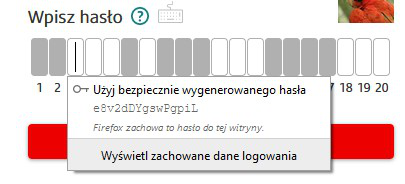
Good morning! I am from Poland and I know very little English. Therefore, I will translate my problem through Google translator. I log in to my bank using a masked password. Firefox keeps showing me a balloon with a suggestion to create its password and remember it. Is it possible to somehow disable this option on this particular page, because it bothers me a lot, instead of helping me.
Good morning! I am from Poland and I know very little English. Therefore, I will translate my problem through Google translator.
I log in to my bank using a masked password. Firefox keeps showing me a balloon with a suggestion to create its password and remember it. Is it possible to somehow disable this option on this particular page, because it bothers me a lot, instead of helping me.
Chosen solution
I do not know how to translate this for you.
Type about:preferences#privacy<enter> in the address bar. Under Logins and Passwords press the Exceptions button to the right.
Read this answer in context 👍 1All Replies (2)

Chosen Solution
I do not know how to translate this for you.
Type about:preferences#privacy<enter> in the address bar. Under Logins and Passwords press the Exceptions button to the right.