

This thread was archived.
Please ask a new question if you need help.

Solved
Archived
Small grey block appears after editing Preferences

I'm running FF4 on Mac OS X 10.5.8. Whenever I open the Preferences panel and close it, I get a 100 x 100 px grey box that blocks the top left corner of the screen (and even goes over windows from other applications). The box goes away if I quit FF, but reappears if I open and close the Preferences panel again.
This also happens in safe mode.
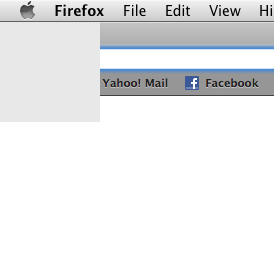
I'm running FF4 on Mac OS X 10.5.8. Whenever I open the Preferences panel and close it, I get a 100 x 100 px grey box that blocks the top left corner of the screen (and even goes over windows from other applications). The box goes away if I quit FF, but reappears if I open and close the Preferences panel again.
This also happens in safe mode.
[http://i34.photobucket.com/albums/d138/Krashbot101/FF-grey-block.png Here's a cropped screenshot displaying the box.]
All Replies (3)
Chosen Solution
Mozilla are aware of this issue and are trying to establish the cause.
- https://bugzilla.mozilla.org/show_bug.cgi?id=641288 - Preferences window opens offscreen without titlebar, leaves white square when closed, can't be moved
- https://bugzilla.mozilla.org/show_bug.cgi?id=636937 - A cube shaped "dead" square after opening and closing the Preferences
Alright, thanks. I'll just wait until the bug gets fixed then.
There is a hidden preference that you can change that may resolve this:
- Type about:config into the location bar and press enter
- Accept the warning message that appears, you will be taken to a list of preferences
- Locate the preference browser.preferences.instantApply, if it is set to false, double-click on it to change its value to true