Firefox is consuming TOO MUCH of RAM on my PC!

Recently I observed Firefox is consuming TOO MUCH of RAM on my PC. It is anywhere between 55 % & 65%. That’s too much! I’ve 12 GB of RAM.
Is this due to updating of FF? Btw, I did not install any Extensions. And if I close Firefox the RAM consumption comes down to around 33%.
I do have 12-14 open Tabs but I always had those open Tabs. Previously FF did not consume so much of memory. What could be the reasons for this heavy RAM consumption?
All Replies (8)

Hi Raz,
Where are you looking at RAM usage? Windows' Task Manager is very misleading in this case, includes cache memory which can be released immediately if something needs it, as it isn't actively used by the application. To see the actual figures, you should take a look at about:processes. If you see something excessively there, there might be something to do about it.
Regards, Balázs
Modified by Balázs Meskó
Balázs, thanks for trying to help me!
Yes, I am looking at RAM through Windows' Task Manager only!
I saw the FF Taskbar. And the main sites which are consuming the most RAM are Gmail and Youtube. It's more than 300 MB. My main Gmail account is consuming more than 600 MB.
By the way, I'd run Clear Recent History. Even after that more than 55 % RAM is being consumed.
There was a time when I'd just 4 GB of RAM and with several open Tabs. My sites were working fine, may be a bit slow. But if FF is now consuming more than 50% of RAM when I've 12 GB RAM then it should not have functioned at all when I'd 4 GB RAM! What do you think?
Generally, if you have more RAM, browsers will use more RAM (unused RAM is wasted RAM as the mantra says). On computers with less RAM, the browser will still work, but it will use less RAM cache but more disk space, and won't be nearly as snappy. I wouldn't worry about it, until it does not cause issues in other applications. Gmail and Youtube are quite heavy web apps, so these numbers seem completely normal to me.
Balaz, after saying, "if you have more RAM, browsers will use more RAM" why did you then said "unused RAM is wasted RAM as the mantra says"?
This looks like some contradiction!
What about your PC? Do you've multiple open Tabs in FF running Gmail and Youtube ? How much RAM does your PC have? And when FF is running how much memory is consumed as shown in Task Manager?
That doesn't sound contradictory?
"if you have more RAM, browsers will use more RAM" why did you then said "unused RAM is wasted RAM as the mantra says"? This looks like some contradiction!
Both seem to point at the same — stability and performance is gained by using the available resources more broadly, so the more RAM you make available, the more of it potentially gets allocated if need be.
And the main sites which are consuming the most RAM are Gmail and Youtube. It's more than 300 MB. My main Gmail account is consuming more than 600 MB.
That's about the typical footprint of these Google assets.
In comparison an average Mozilla Support or Bugzilla tab clocks at ~40–50MB for me (slightly more when signed in). Compared to e.g. GitHub, depending on the content/page type, when signed in these tabs routinely take up ~250–500MB each for me. So it mainly depends on how heavy the web apps are, and how much of the work they hand off to the browser.
There was a time when I'd just 4 GB of RAM and with several open Tabs. My sites were working fine, may be a bit slow. But if FF is now consuming more than 50% of RAM when I've 12 GB RAM then it should not have functioned at all when I'd 4 GB RAM! What do you think?
If there were resource constraints, it would have tried to optimize the processes to fit, with potential performance and stability caveats though.
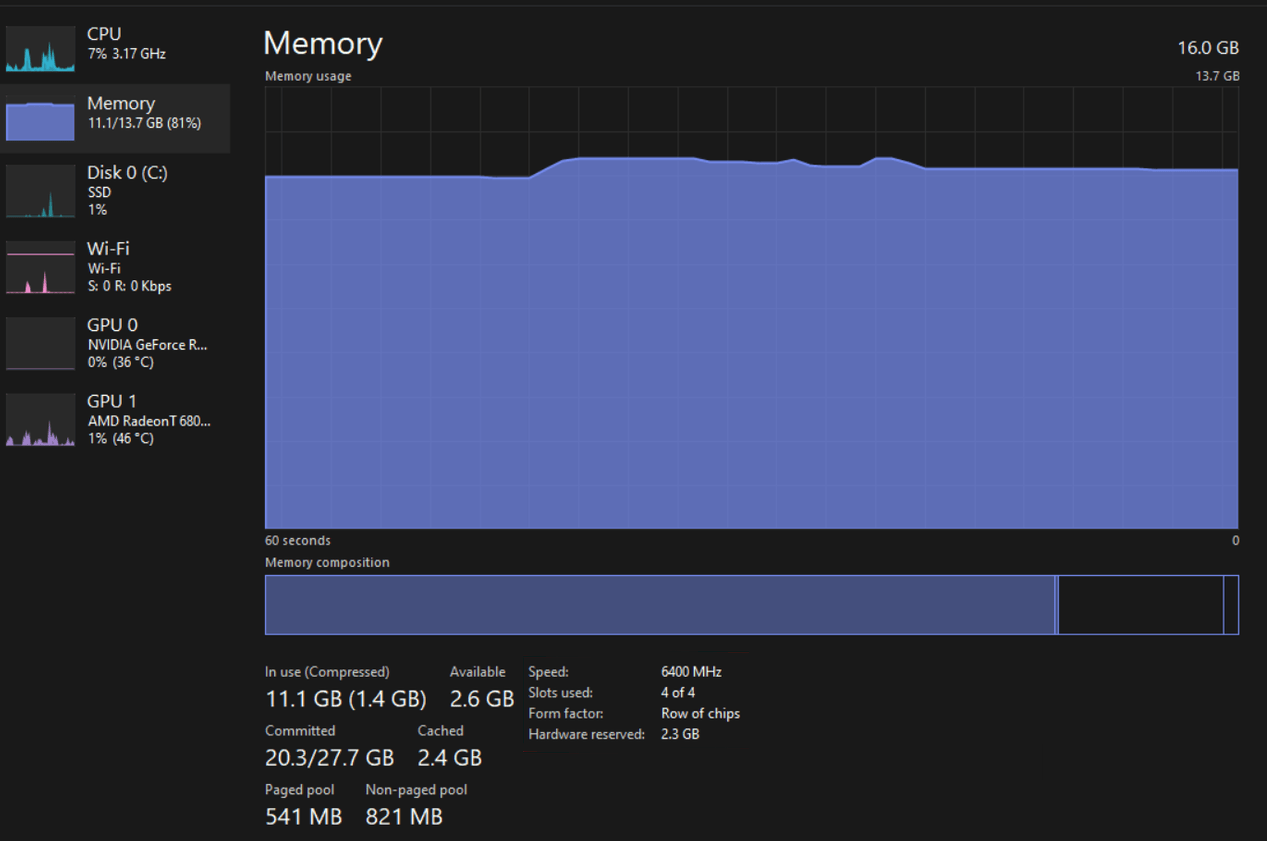
The slowness is the key part. What can't fit into RAM gets swapped to disk, so back in the day a lot of slow HDD work was involved. It has improved these days with SSD and powerful CPU/SoC potentially ably to compress memory on the fly as well, so the numbers don't have to add up — e.g. in my case 16GB physical RAM doesn't mean I can't be using up more memory than that — my processes regularly run into 30–40GB range, but it means compressing and swapping out to disk. So it was like that even back in the day, it was just noticeably slower at that point I guess.
JBR, thanks a lot for you in-dept explanations, in contract to, Balaz remaining silent after reading my 2nd post.
>> "my processes regularly run into 30–40GB range" (and you've 16GB RAM)
Does this mean in Task Manager it shows 100% for Memory?
Task manager readouts need to be taken with a pinch of salt. This is an example where 2GB+ is reserved for VRAM already, yet the commit shows 21/28GB — so that's that in practice: