


Windows 10 reached EOS (end of support) on October 14, 2025. If you are on Windows 10, see this article.

Search Support

Avoid support scams. We will never ask you to call or text a phone number or share personal information. Please report suspicious activity using the “Report Abuse” option.

Learn More
Open

Usernames and Passwords aren't autofilling.

Asher

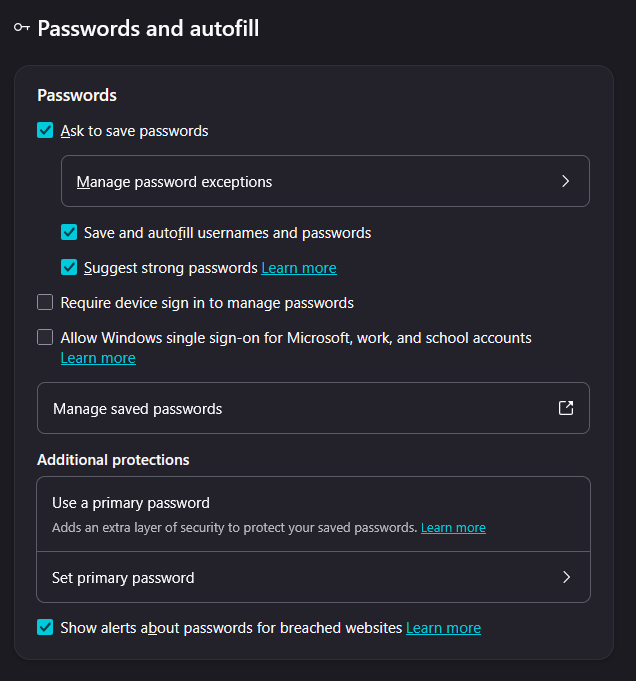
All my passwords are updated, Firefox is updated, computer is updated, I've restarted both my PC and Firefox, and I've double-checked that all the username and passwords are saved to the most recent. Usually when I click the area where you'd enter your username or password, it would prompt you to click and have it autofill. Hasn't been happening at all for me. Sometimes if I right click it then it'll give me the option to select it but it rarely gives me that option. I've been manually entering both and there would be a chance it prompts to autofill at least the password. I'm not sure if I'm missing something or maybe overlooking an option? I do have everything switched on in settings for it to autofill on it's own but it still doesn't do it like it used to. Is there anything I might be overlooking or completely missing?
All my passwords are updated, Firefox is updated, computer is updated, I've restarted both my PC and Firefox, and I've double-checked that all the username and passwords are saved to the most recent. Usually when I click the area where you'd enter your username or password, it would prompt you to click and have it autofill. Hasn't been happening at all for me. Sometimes if I right click it then it'll give me the option to select it but it rarely gives me that option. I've been manually entering both and there would be a chance it prompts to autofill at least the password. I'm not sure if I'm missing something or maybe overlooking an option? I do have everything switched on in settings for it to autofill on it's own but it still doesn't do it like it used to. Is there anything I might be overlooking or completely missing?
Attached screenshots

All Replies (1)

Can you check for updates again? You're a version behind, and today another update will be out.

There were some autofill issues during v155.x that warranted some remote interventions and migrations — and if you're not receiving remote improvements you might need to wait for the patches to ship in actual app updates.

Ask a question

You must log in to your account to reply to posts. Please start a new question, if you do not have an account yet.