


Delete "Weitere Lesezeichen" in sidebar

Hi,
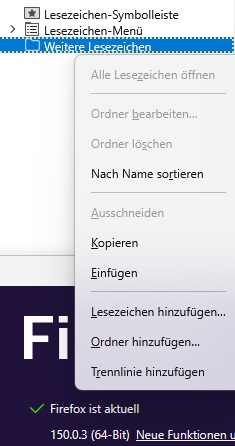
I searched the web for deleting the item "Weitere Lesezeichen" in the sidebar. I found only solutions for the firefox 85. In Firefox 85 should be a field for hiding this. Although in Firefox 150 it can`t be hided or deleted. I don`t need and I don`t want this "Weitere Lesezeichen". Any solutions?
All Replies (7)
The only thing I can think of is to use css to #??? {display:none}
For this to work you must create the file /chrome/userChrome.css in your current profile.
but you also have to find the object name '#???' which can be a little time consuming
Hallo
Ich benutze, Übersetzungsfunktion in Firefox. Um es in betrieb zu sehen, kann ich auch about:translations in die adressleiste eingeben.
Sie haben auch die möglichkeit, die community zu kontaktieren https://www.camp-firefox.de/forum
Thanks for responding!
I already have the userChrome.css for smaller bookmarks in the sidebar.
All bookmarks should be saved in "places.sqlite" also the folder "Weitere Lesezeichen".
But how can I hide this folder with the css?
You have to find the ID or class for the 'selector' then it's easy. {display:none}
You could start here maybe
https://developer.mozilla.org/en-US/docs/Web/API/Document_Object_Model
Modified by amoun
Thanks again!
I think, there is a problem with my profile or Mozilla doesn`t want to hide the "other bookmarks" folder. I found in the about:config the switch
browser.toolbars.bookmarks.showOtherBookmarks = false
It doesn`t matter if it`s on true or false. There are no changes after rebooting the browser of course.
This code added to the css doesn`t work as well:
- menu_unsortedBookmarks {
display: none !important;
}
- BMB_unsortedBookmarks {
display: none !important;
}
If the "Other Bookmarks" folder in your Library no contains any bookmarks.
It's not perfect, but, you can test https://www.camp-firefox.de/forum/thema/140454-weitere-lesezeichen-ausblendeny
Sie haben auch die möglichkeit, die community zu kontaktieren.