

This thread was archived.
Please ask a new question if you need help.

Solved
Archived
Cannot activate All Folders anymore

I created a lot of personal folders and they are all of a sudden gone. I only see Recent. When I try and click All Folders in "view" it doesn't respond.
I created a lot of personal folders and they are all of a sudden gone. I only see Recent. When I try and click All Folders in "view" it doesn't respond.
All Replies (2)
Is it so difficult to disable "Recent" and select "All Folders" in the View menu?
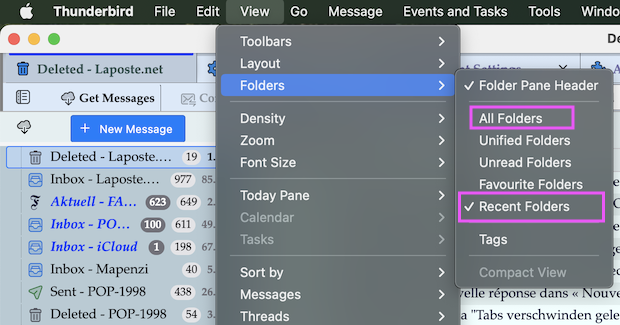
Chosen Solution
@uschi, if your problem is solved, please click the "Solves the problem" here in your question.
A not well known fact, is the order in which the folder modes are shown in the folder pane is controlled by sequence in which you enabled the mode choices. So if you have both "All folders" and "Recent folders" enabled but recent folders was enabled first, then that choice will be at the top of the folder pane.