


Thunderbird won't install

I'm trying to install Thunderbird on a Macbook - macOS Tahoe 26.2 I've made a donation but Thunderbird won't download.
I did not get any error messages, in fact nothing happened.
Chosen solution
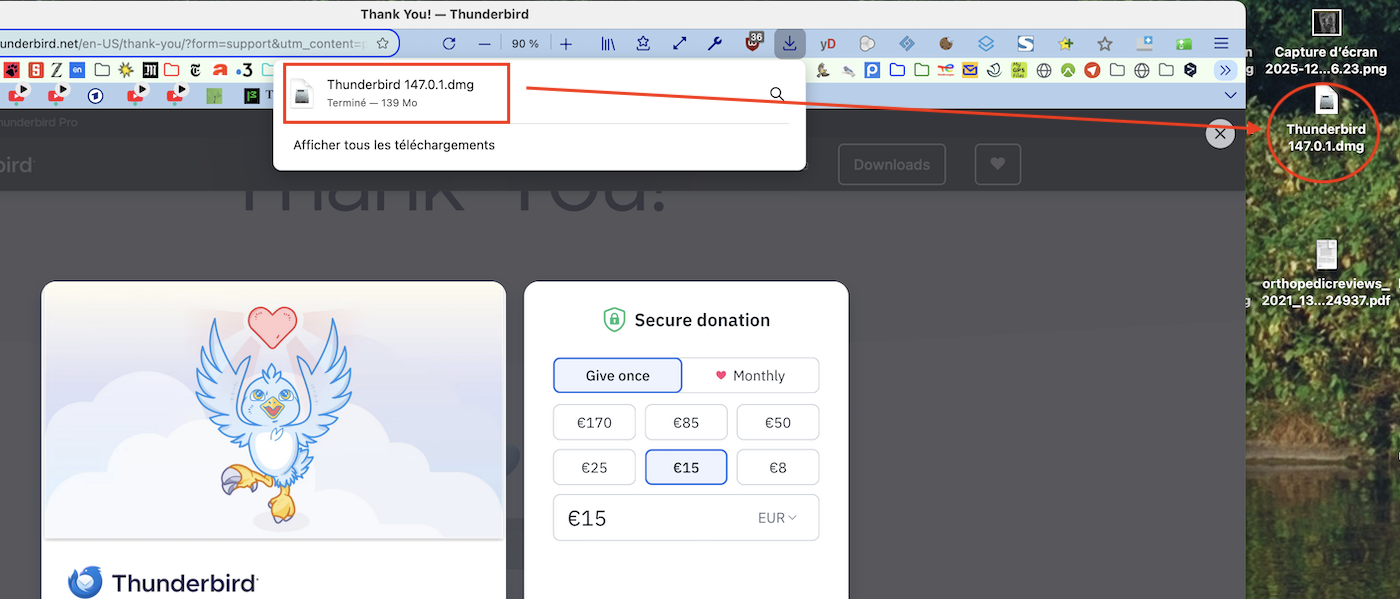
I just tested to download the "Thunderbird.147.0.1.dmg" installer disk image with Firefox from the linked page. The download was very quick and at its end a popup window indicated that the download was terminated. At the same moment the https://www.thunderbird.net/en-US/desktop/ web page switched to the donation screen and the Thunderbird.147.0.1.dmg icon appeared on my Desktop. Maybe at the end of the download you didn't notice that in the meantime the download action had taken place....?
My desktop is the "target folder" when I download files or folders using Firefox. I don't know to which directory you download files, but did you verify whether it contains the Thunderbird.147.0.1.dmg installer disk image?
Read this answer in context 👍 0All Replies (4)

..... won't download ??? Or cannot install? Where do your try to get the Thunderbird Mac version from? Try once again going to this page https://www.thunderbird.net/en-US/desktop/
Modified by Mapenzi
Thanks for the quick response.
When I click on the download button, I'm taken to the donation screen. I've made a donation if I do get past the donation screen and click on the download button the donation screen pops up again.
Chosen Solution
I just tested to download the "Thunderbird.147.0.1.dmg" installer disk image with Firefox from the linked page. The download was very quick and at its end a popup window indicated that the download was terminated. At the same moment the https://www.thunderbird.net/en-US/desktop/ web page switched to the donation screen and the Thunderbird.147.0.1.dmg icon appeared on my Desktop. Maybe at the end of the download you didn't notice that in the meantime the download action had taken place....?
My desktop is the "target folder" when I download files or folders using Firefox. I don't know to which directory you download files, but did you verify whether it contains the Thunderbird.147.0.1.dmg installer disk image?
Modified by Mapenzi
I feel a bit of an idiot for not checking if it had actually downloaded, which it had.
Thanks for you help.