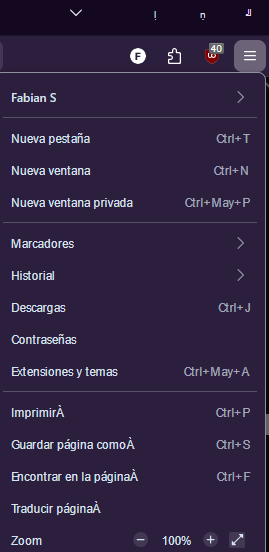
Firefox UI fonts are really messed up

I'm having trouble with the ui elements on firefox, the min/max/close buttons are showing some random characters and the menu also shows an "Á" besides some options.
Here's what I tried: reinstalling, clean reinstall, delete start cache, fresh restart, troubleshoot mode, On windows: restore font configuration, sfc /scannow, dism cleanup-image restorehealth, deleting all aditional installed fonts and saving only system included fonts.
Still, the font on tabs and some menus looks strange, and the problem with buttons and menus keeps happening.
I don't really know what else to do
I'm having trouble with the ui elements on firefox, the min/max/close buttons are showing some random characters and the menu also shows an "Á" besides some options.
Here's what I tried: reinstalling, clean reinstall, delete start cache, fresh restart, troubleshoot mode,
On windows: restore font configuration, sfc /scannow, dism cleanup-image restorehealth, deleting all aditional installed fonts and saving only system included fonts.
Still, the font on tabs and some menus looks strange, and the problem with buttons and menus keeps happening.
I don't really know what else to do