


sync all tabs

Is there some way to open all tabs on a synced device. I have the list of tabs showing in the sidebar. However, the instruction: "While viewing synced tabs in Sidebar, right clicking on device name allows you to open all tabs from a device at once." does not work. Right clicking does nothing. Version 147.0.2 (64-bit) in Windows 11. Thank you.
Chosen solution
Great. Mark this issue resolved to remove it from our list and have a nice day.
Read this answer in context 👍 0All Replies (3)
Since you've failed to show the issue, I'll guess that you're using that new sidebar option that I'm not. I can right on one of my other devices and open all the tabs. see screenshots
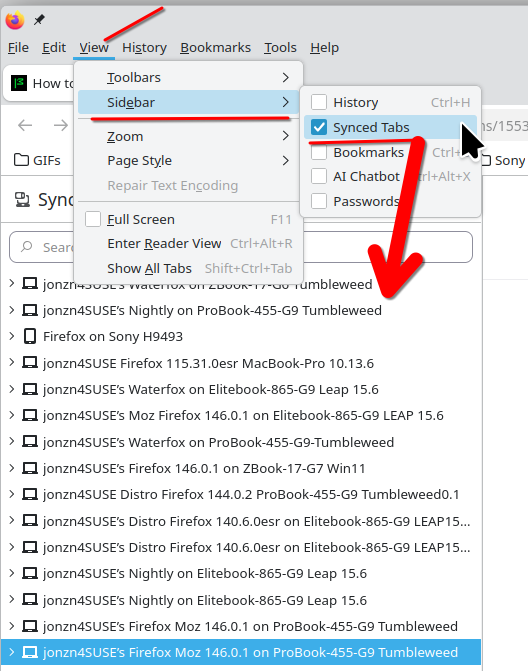
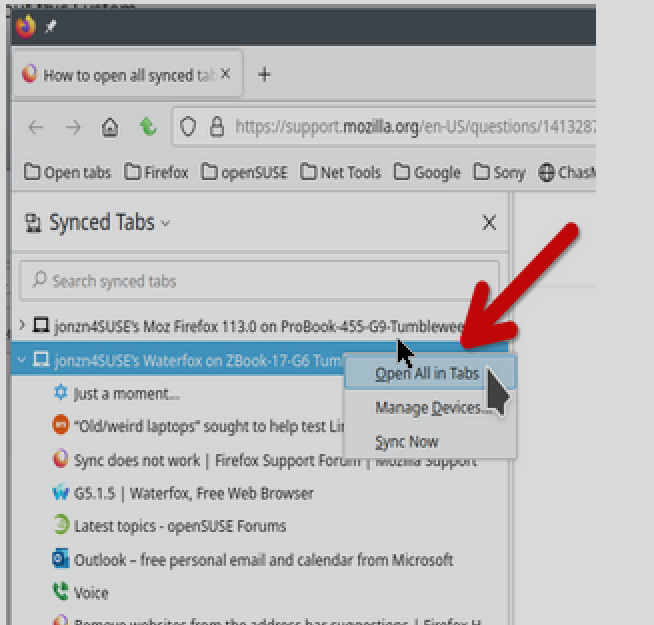
Thank you for replying so quickly!
My problem was that nothing happened when I right clicked on any of the lists of tabs (whether on the side bar or elsewhere) "open" on the other device. I don't know why.
However, I solved my problem by using the "Tab Session Manager" extension. Exporting the list to a USB drive which I then put in the device I wanted to move the tabs too. Then importing that file. The only trick is that one has to pin the extension to the FireFox toolbar to have access to the tabs and windows, which is done by clicking on the clipboard type of icon up by the three horizontal bars on the (almost) top right. (I wrote that in case someone else has a similar problem and is looking for a solution.)
So thank you again, Stephen.
Chosen Solution
Great. Mark this issue resolved to remove it from our list and have a nice day.