


Thunderbird and Mediacom

I am losing my Mediacom ISP account (which I have had for 20 years) at the end of this month. I have used Mediacoms web mail server all this time and want to keep many emails and addresses that are on their server. I was told that Thunderbird would allow me to transfer/copy these messages to my computer and retain them there in Thunderbird after I no longer have access to Mediacoms server. I have installed Thunderbird 3 times and spent 2-3 days with help from this forum trying to gt it to work properly but have not succeeded. I have a windows 10 HP laptop and am not completely computer literate so I don't believe I will solve this by myself. I even loaded up an old windows 7 computer which I did with ver 15. but that didn't work either. THe one difference I did notice is that the Tbird auto installation on my Win 10 machine selects POP and on the Win 7 machine it selects IMAP. Mediacom is uses IMAP
Chosen solution
About the username, all I can say is what I have said before: Mediacom says that you should use your full e-mail address. Maybe not using it is related to the connection errors. I don't know.
Yes, you can delete the IMAP account in Thunderbird without affecting the local folders.
The easiest way to back up your Thunderbird folder is Tools - Export. If your profile is more than 2 GB, you should copy in the file system. Find your profile via Help > Troubleshooting information > Profile Folder > Show in [...]. Go up a level to the Thunderbird folder. Copy that to an external drive.
Even better would be to back up your whole internal drive regularly.
I don't know much about contacts in Thunderbird. You may have to export contacts from your Mediacom account, if that's possible, then import them into Thunderbird. Or you have to connect an address book in Thunderbird to the Mediacom account and copy your contacts to a local address book to preserve them. I don't know. I suggest that you start a new discussion just about contacts.
Read this answer in context 👍 0All Replies (18)
- first, install the account as IMAP. You can specify this during setup
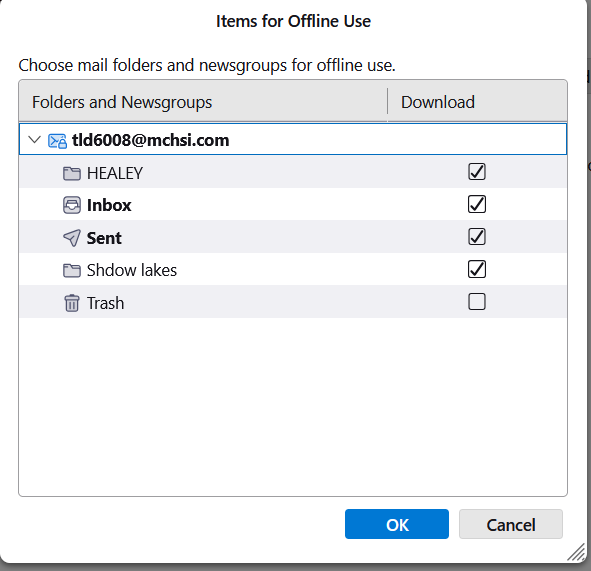
- then, click the 'synchronization&storage' pane and the 'advanced' button to verify that all desired folders are set for download
- while on that pane, check that disk space is set to sync all messages
- next, click file>offline>download to ensure all messages are downloaded (if menu bar not visible, press the alt key first)
- at this point, all messages should be on PC. install the addon, importexporttools NG
- highlight one of the accounts folders, such as Inbox. rightclick, and select the importexport option to export mbox
- repeat the step for each folder from the account
- now, highlight Local Folders
- rightclick and select the importexport option to import mbox and select one of the exported mbox files
- repeat for the remaining folders - spot check to ensure you can view content on each folder
- at this milestone, you have safely copied all messages to Local folders
- I don't know the format of the mediacom contact list, but they probably offer csv format. Do that and follow up with this same thread for assistance in importing that properly.
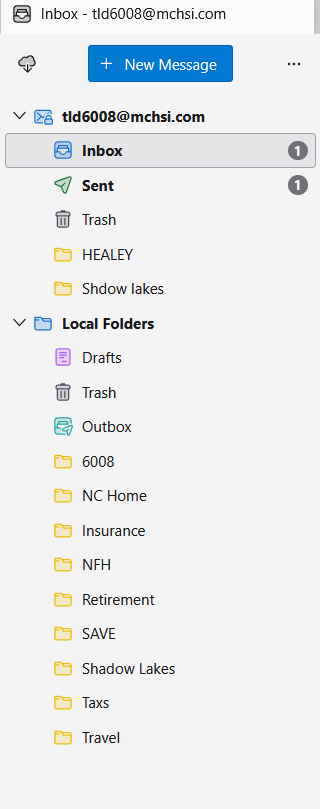
2. then, click the 'synchronization&storage' pane and the 'advanced' button to verify that all desired folders are set for download (two folders out of 20 were displayed here, see image )
Second image is my newly created Thunderbird inbox but it is missing several folders from my Mediacom email account
highlight the account rightclick and select 'subscribe' and then tick the boxes for the remaining folders
Connection to the server was refused, this is actually about the 10th time I have done this over the last several days. When I opened the subscribe box items were already checked isn't that a little strange?
Are you referring to the Server Folder and the Local Folder? If so they have always shown up, I have been referring to the sub folders which I can't completely get moved to Thunderbird at least not with their contents

At the end of the last discussion, I suggested that you create a new profile, start from scratch, and let Thunderbird find the settings for your account. Apparently, you did not do that. So you are still in the same position: something is wrong with your account set-up. Connections may continue to be refused. Folders may continue to be missing from your Thunderbird account.
When I opened the subscribe box items were already checked isn't that a little strange?
No, it is not strange for some items to be checked. As I said last time, forum supporters need more detail. Which items were already checked? Did you see items that were not checked? Did you check them?
Are you referring to the Server Folder and the Local Folder? If so they have always shown up, I have been referring to the sub folders which I can't completely get moved to Thunderbird at least not with their contents
No, those are accounts, not folders. As I explained last time, the other folders are not sub-folders. Sub-folders are contained by other folders. Your screen image shows two accounts with folders, no sub-folders. You said last time that you had sub-folders on the server, but I do not know if you did because you seemed to use the term "sub-folder" incorrectly.
And you are not trying to get folders moved to Thunderbird. IMAP accounts synchronize messages. What you want is that Thunderbird retrieve and store the same folders and messages that are on the server and keep those folders in sync with the server folders.
How do I create a new profile? I have uninstalled the program numerous times and downloaded /reinstalled it which I thought would be starting from scratch but apparently not.
tld6008 said
How do I create a new profile? I have uninstalled the program numerous times and downloaded /reinstalled it which I thought would be starting from scratch but apparently not.
I gave you step-by-step instructions in the last discussion.
Here is what I would do to start from scratch and try to get a properly set-up IMAP account.When you have problems, start a new discussion. We will hope that someone who knows something that I don't will respond.
- Disable Total Defense and keep it disabled.
- Do not do anything with folders, either in the IMAP account or in local folders until the IMAP account is set up properly.
- Create a new Thunderbird profile (where a user's accounts and messages are stored) and delete the old one. <alt> if needed to show menu > Help > Troubleshooting information > about:profiles. Create a new profile. Re-start Thunderbird. <alt> if needed to show menu > Help > Troubleshooting information > about:profiles > set the new profile as the default and remove the old one.
- Re-start Thunderbird to ensure that the new default profile is being used.
- Create a new account. Let Thunderbird find the settings. Make sure that it's an IMAP account.
- Check the new account. Does it look like my last screen image? Does it have all the IMAP server folders that it should have? Does it have the folders that you created on the server? If not, right click on the account name in the folder pane, select "Subscribe", and check all the folders. Expand the inbox in that list of folders to subscribe to if there are sub-folders of the inbox. Send a test message to yourself. Does it get sent? Received? Saved in the "Sent" folder? Are there connection issues? Do all the folders have the messages in them that they have on the server? If there are problems, check the settings that Thunderbird found against the settings that Mediacom says are needed (see attached image).
- If/when everything looks good, copy the user-created folders from the IMAP folders to the local folders. Right click on a folder > Copy et cet.
Stop re-installing Thunderbird. That is not going to help.
I created the new profile and set it as default
Check the new account. Does it look like my last screen image? Does it have all the IMAP server folders that it should have? YES Does it have the folders that you created on the server?NO If not, right click on the account name in the folder pane, select "Subscribe", and check all the folders. Expand the inbox in that list of folders to subscribe to if there are sub-folders of the inbox. Did that and now have all the folders from my Mediacom account Send a test message to yourself. Does it get sent? YES Received? Was not received in Thunderbird but was received at Mediacom Saved in the "Sent" folder? No Are there connection issues? There are connection issues, Could Not Connect to the Server Mail.MCHSI.com the connection was refused Do all the folders have the messages in them that they have on the server? No messages in any folders If there are problems, check the settings that Thunderbird found against the settings that Mediacom says are needed (see attached image).
I went back and the server settings were both Mail.mchsi.com I changed them to mail.mediacombb.net and sent another test message and it was received after about 3 minutes and it was saved to the sent folder although that took about 3 minutes also. I still received the message Could not connect to the server ect. but it listed the BB.net one. All the folders are being populated as I type this
That's some progress.
Would you please post all the settings of the outgoing server so we can use them again if needed?
Server name: Port: Connection security: Authentication method: And the user name is your full e-mail address, right?
Please report again after the populating of the folders ends. Do the message counts in each folder match the message counts on each folder in webmail?
Please don't do anything else with folders yet, no creating, no copying, no moving. Don't touch local folders.
When you report again, would you please post an image of your folder pane?
If all folders are syncing properly with the server, we can work on the connection and sending issue(s) next.
Would you please post all the settings of the outgoing server so we can use them again if needed?
Server name: smtp.mediacombb.net Port: 587 Connection security: STARTTLS Authentication method: Normal Password And the user name is your full e-mail address, right? No it is tld6008
Please report again after the populating of the folders ends. Do the message counts in each folder match the message counts on each folder in webmail? YES
Please don't do anything else with folders yet, no creating, no copying, no moving. Don't touch local folders.
When you report again, would you please post an image of your folder pane?
If all folders are syncing properly with the server, we can work on the connection and sending issue(s) next.
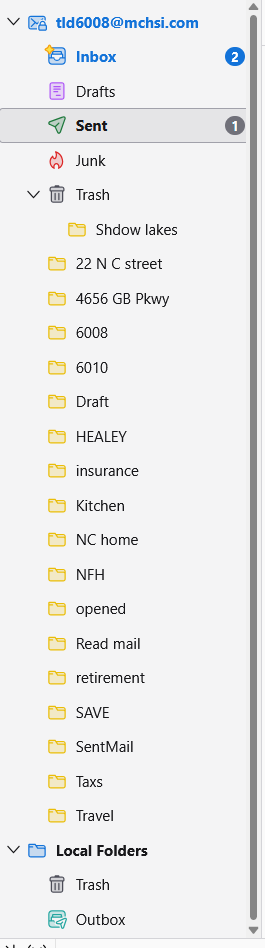
You said that the servers were both set to mail.mediacombb.net. I wanted to know the settings that Thunderbird found. Did Thunderbird find smtp.mediacombb.net for the outgoing server or did it find mail.mediacombb.net and you changed it?
Why are you not using your full e-mail address for the outgoing server? Are you using your full e-mail address for the incoming server?
Are you still getting connection errors? Do they happen when Thunderbird fetches mail or only when it sends mail?
Anything related to your Mediacom account other than getting the messages in your IMAP folders copied to local folders does not matter much, especially if you have already established e-mail service with a new service provider. Have you?
Do you want the Shadow Lakes folder in the trash or do you want to move it out of the trash? Click and drag it back to your IMAP account.
OK, if the message counts match in all the folders, we can now copy the messages to your local folders. Start with one folder, 22N C Street. Do this:
- Create a corresponding local folder. Click on "Local Folders" and select "New Folder". Name the new folder "22N C Street" and save. I know that you have done this before and that you know how to do it.
- Click on the 22N C Street folder under your IMAP account.
- Press <control>+<a> to select all the messages in that folder.
- Right click anywhere on the messages > Copy to > Local Folders > 22N C Street
Monitor the copy progress in the status bar at the bottom of Thunderbird's window. When the copying is done, check that the 22N C Street folder in Local Folders has the same message count as the 22N C Street folder in your IMAP account. If it does, celebrate. Now all you have to do is repeat this process for the other IMAP folders.
Then make a back-up copy of your Thunderbird folder.
Then you want to stop filing messages in the IMAP folders and you want to decide when to get all the messages out of inbox, sent, drafts, and trash before you lose your Mediacom account.
After you lose your Mediacom account, you can delete the account in Thunderbird.
(I see that Thunderbird calls top-level folders "sub-folders". Maybe that's why you do also. I don't think that they should be called sub-folders.)
You said that the servers were both set to mail.mediacombb.net. I wanted to know the settings that Thunderbird found. Thunderbird found Mail.mediacom.com or Mail.mchsi.com I don't remember exactly but it was not the mediacombb.net addressDid Thunderbird find smtp.mediacombb.net for the outgoing server or did it find mail.mediacombb.net and you changed it? It was not mediacombb, thats all I know Why are you not using your full e-mail address for the outgoing server? Are you using your full e-mail address for the incoming server? I would have used that if prompted but upon searching to answer your question the only places (i found 2) that had the User Name it was tld6008 Are you still getting connection errors? Do they happen when Thunderbird fetches mail or only when it sends mail? They occur whenever I select anything in the folder pane that prompts a connection to the server although I am constantly getting new mail from the server Anything related to your Mediacom account other than getting the messages in your IMAP folders copied to local folders does not matter much, especially if you have already established e-mail service with a new service provider. Have you? I have a yahoo account that I have had for a few years the reason is the mediacom server is totally full of spam messages and there is no way to stop it, I was told it was never created to act as a true email server. Like if you designate a message as spam it goes into a spam folder but doesn't direct further messages there. About 90% of my received messages are spam
Do you want the Shadow Lakes folder in the trash or do you want to move it out of the trash? Click and drag it back to your IMAP account. I had tried to delete it it's no longer needed OK, if the message counts match in all the folders, we can now copy the messages to your local folders. Start with one folder, 22N C Street. Do this:
   Create a corresponding local folder. Click on "Local Folders" and select "New Folder". Name the new folder "22N C Street" and save. I know that you have done this before and that you know how to do it.
   Click on the 22N C Street folder under your IMAP account.
   Press <control>+<a> to select all the messages in that folder.
   Right click anywhere on the messages > Copy to > Local Folders > 22N C Street
Monitor the copy progress in the status bar at the bottom of Thunderbird's window. When the copying is done, check that the 22N C Street folder in Local Folders has the same message count as the 22N C Street folder in your IMAP account. If it does, celebrate. Now all you have to do is repeat this process for the other IMAP folders.
Then make a back-up copy of your Thunderbird folder. I have copied all the folder contents to Local Folders but don't understand the Backup of the Thunderbird folder
Then you want to stop filing messages in the IMAP folders and you want to decide when to get all the messages out of inbox, sent, drafts, and trash before you lose your Mediacom account. I have dealt with the most of those messages already
After you lose your Mediacom account, you can delete the account in Thunderbird. Do you mean the IMAP account and the local folders will remain? What about my contact list should I transfer that to one of the folders and copy to a new Local folder?
(I see that Thunderbird calls top-level folders "sub-folders". Maybe that's why you do also. I don't think that they should be called sub-folders.)
Chosen Solution
About the username, all I can say is what I have said before: Mediacom says that you should use your full e-mail address. Maybe not using it is related to the connection errors. I don't know.
Yes, you can delete the IMAP account in Thunderbird without affecting the local folders.
The easiest way to back up your Thunderbird folder is Tools - Export. If your profile is more than 2 GB, you should copy in the file system. Find your profile via Help > Troubleshooting information > Profile Folder > Show in [...]. Go up a level to the Thunderbird folder. Copy that to an external drive.
Even better would be to back up your whole internal drive regularly.
I don't know much about contacts in Thunderbird. You may have to export contacts from your Mediacom account, if that's possible, then import them into Thunderbird. Or you have to connect an address book in Thunderbird to the Mediacom account and copy your contacts to a local address book to preserve them. I don't know. I suggest that you start a new discussion just about contacts.