


"cloning" Thunderbird

Have TB on my laptop (146.0.1 (64-bit) on Win11) all set up the way I want it. Would like to "clone" those settings/profiles to my desktop. AI site said, "Copy profiles folder and profiles.ini to the new machine." Didn't work. Asking me to set up from scratch. Laptop is on "standard" edition, think desktop is on beta. Is that the problem? What do I need to do?
All Replies (4)
There is no AI here. Despite someone accusing me of being an AI yesterday.
One of the problems with AI is it is only as good as the database it uses to generate it's answers. With something dynamic like the copying of Thunderbird profile (it has changed repeatedly in recent years) the AI is worse than useless because they apparently have no concept of "current"
open Thunderbird on the machine you wish to update. Goto the troubleshooting information on the help menu and click the show profile button in the first block of troubleshooting information.
Close Thunderbird once the windows file manager opens. Now copy you old profile data (that will be in a folder with one of the files being prefs.js) in to replace the files and folders in the profile Thunderbird just opened. You will be asked to replace files. If you are not you are not doing it correctly.
Once the copy is completed restart Thunderbird. You are done.
Alternatively you could use the troubleshooting information on your donor computer to just identify the actual profile folder in use that needs to be copied (including all sub folders. No guessing required this way.
Didn't mean to imply you were AI; I appreciate your help. Found something that had me copy an entire folder named Thunderbird to the desktop. Was a day or two ago, and I'm old, so I don't remember the exact location of the folder on my desktop. I think C:\Users\dalew\AppData\Roaming\Thunderbird and the "clone" on my Desktop seems to work. If that won't work, let me know and I'll follow what ever instructions you have. One thing I noticed about AI, mainly using Copilot, is that the answers it gives are not "up-to-date." It starts by giving "older" data that is not pertinent to today. You end up getting answers that apply to historical app versions. If you keep things up-to-date, as I generally do, you end up getting several messages that don't apply to your situation. I'm slowly adding "as of today" to my questions to get pertinent answers. Usually get better results.
Modified by PathMan
TRy this if you are having a problem.
Make sure you have the same version of Thunderbird on both computers. Do you did not mention whether you got Thunderbird from Windows app store or whether you downloaded from website. This info is important as it effects where the profile is stored. I'm going to assume you got it from the website for both laptop and desktop:
On Desktop computer Firewall Access Firewall - either the default on computer OR it might be controlled by an Anti-Virus you installed. Make sure Thunderbird program has been set up as 'allowed'
VPN Check desktop does not have a VPN enabled. There are many Anti=Virus products that now provide VPN an I have come across many cases where it had been auto enabled. Switch off VPN.
Now to get copy/clone of laptop 'Thunderbird' onto desktop computer.
Computer Laptop
- Exit Thunderbird - this is important
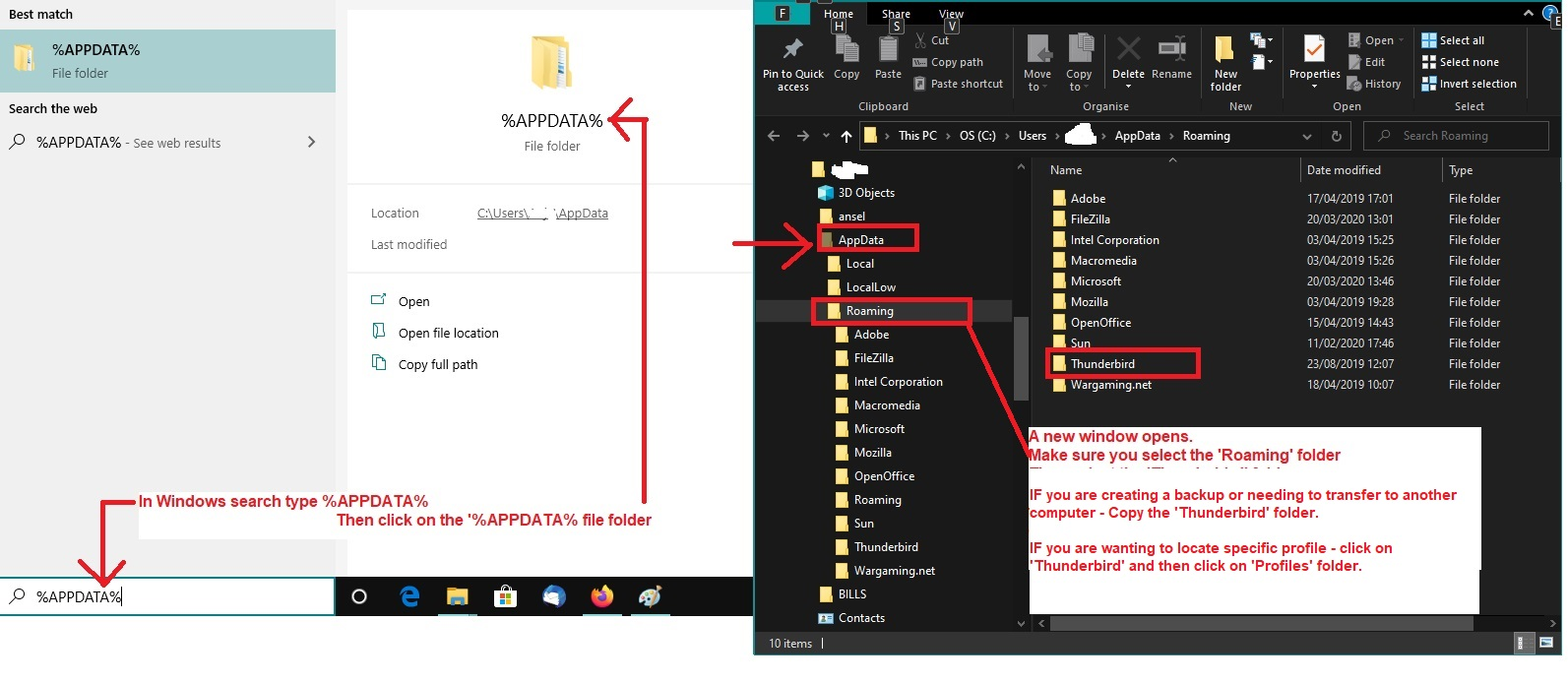
- In windows search type: %Appdata% - see image below as guide
- select %Appdata% file folder
- Select 'Roaming'
- Copy the 'Thunderbird' folder to external device
Computer desktop
- Exit Thunderbird - this is important
- In windows search type: %Appdata% - see image below as guide
- select %Appdata% file folder
- Select 'Roaming'
If you had run Thunderbird the first time it will have created a default Thunderbird folder
- Delete that new 'Thunderbird' folder
- Paste the copied 'Thunderbird' folder into the 'Roaming' folder.
start Thunderbird.
PS: Matts advice on AI is good. I tend to stay well clear of it.
Make sure you have the same version of Thunderbird on both computers. I made sure.
Do you did not mention whether you got Thunderbird from Windows app store or whether you downloaded from website. Learned my lesson, TB Website
On Desktop computer
Firewall
Access Firewall - either the default on computer OR it might be controlled by an Anti-Virus you installed.
Make sure Thunderbird program has been set up as 'allowed' Only firewall is Windows Defender. Haven't had a problem before.
VPN Check desktop does not have a VPN enabled. There are many Anti=Virus products that now provide VPN an I have come across many cases where it had been auto enabled. Have surfshark, but only use it occasionally. Does not run all the time. Switch off VPN.
Now to get copy/clone of laptop 'Thunderbird' onto desktop computer. Pretty sure this is what I did. Haven't used my desktop for a few days, so not fully checked out.
Will see how that goes. Thanks for the hep.