How to lock certain settings in mozilla firefox

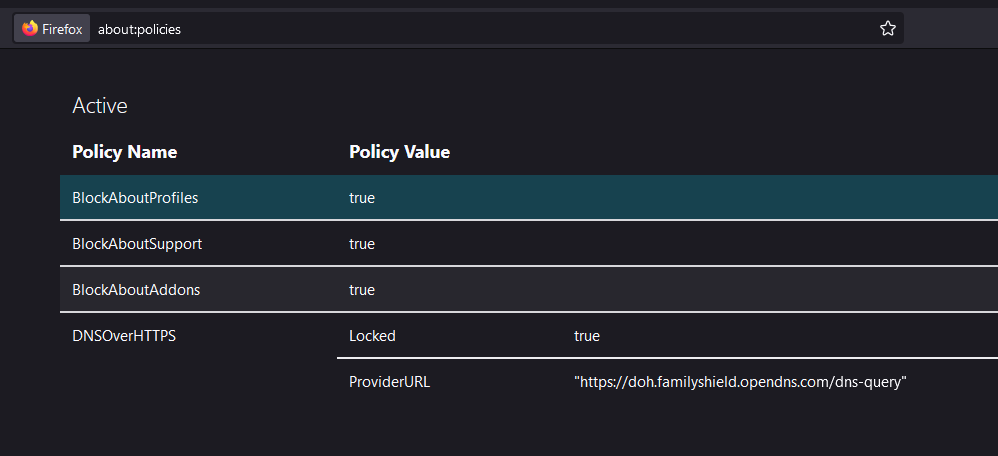
hi i am new to this forum, i would like to lock the dns over https option in firefox(fix it to url of my choice) i am currently working on windows 10 pro i have already succesfully blocked about:addons and about:support by creating dword in windows registry but was unsuccesfull in doing so for lock DoH option is there any solution to achieve what i want
hi i am new to this forum,
i would like to lock the dns over https option in firefox(fix it to url of my choice)
i am currently working on windows 10 pro
i have already succesfully blocked about:addons and about:support by creating dword in windows registry
but was unsuccesfull in doing so for lock DoH option
is there any solution to achieve what i want
All Replies (2)
This is the config of DoH:
Software\Policies\Mozilla\Firefox\DNSOverHTTPS\Enabled = 0x1 | 0x0
Software\Policies\Mozilla\Firefox\DNSOverHTTPS\ProviderURL = "URL_TO_ALTERNATE_PROVIDER"
Software\Policies\Mozilla\Firefox\DNSOverHTTPS\Locked = 0x1 | 0x0
Software\Policies\Mozilla\Firefox\DNSOverHTTPS\ExcludedDomains\1 = "example.com"
i tried doing that it even showed up in about:policies after i rebooted my system but when i go to settings i can still toggle back dns option it doesnt lock it