

This thread was archived.
Please ask a new question if you need help.

Solved
Archived
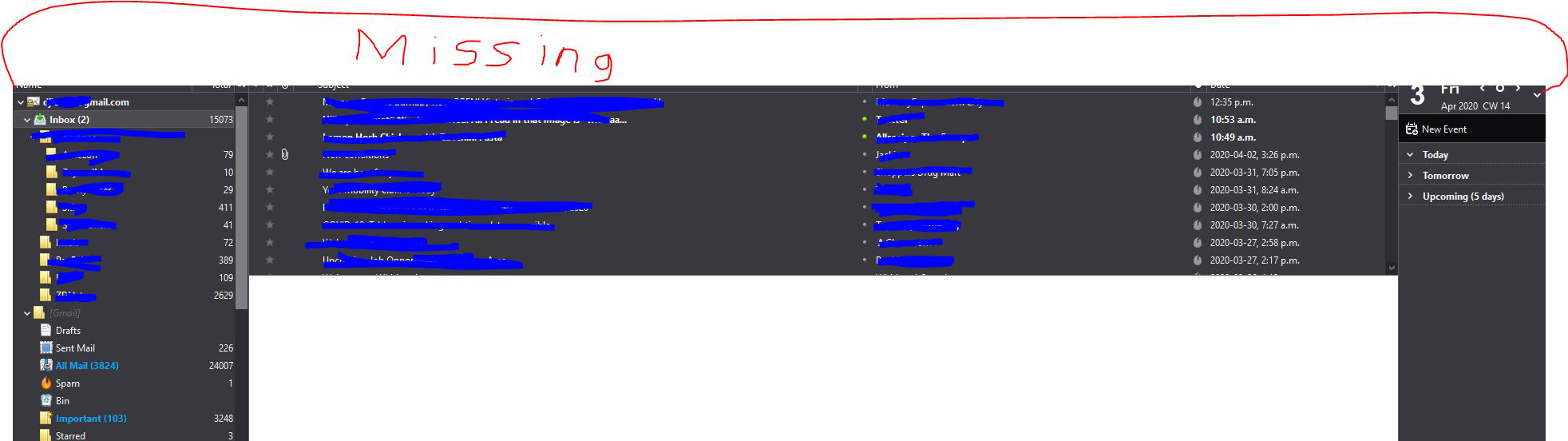
Top of Thunderbird is missing
The entire top of Thunderbird is missing. No minimize, expand or close. No Menu or toolbars. See picture for what I am talking about. All other programs are fine including Firefox. I have to right click the program on the taskbar to close it.
The entire top of Thunderbird is missing. No minimize, expand or close. No Menu or toolbars. See picture for what I am talking about. All other programs are fine including Firefox. I have to right click the program on the taskbar to close it.
All Replies (2)
Hold the shift key when you start Thunderbird and continue in safe mode when prompted. Any different?
Chosen Solution
After a lot of hunting I found out the latest Geforce GRD caused the issue, I had to roll back to a previous version.
Modified by Shaun