


I'm sick of constantly having to find the menu bar these days!

Those instructions don't work and I'm sick of spending so much time on this problem these days.
Now thinking it happens after an update, which is a problem because they seem to come just days apart. None of the solutions offered works because right-clicking on the top doesn't do anything. Nor does going into the settings in the app on my laptop or online. I've downloaded and installed the latest version of Firefox more than once in the recent past. I've also shut down my laptop and rebooted. Nothing works. It's extremely annoying not to be able to access the features that I use *all the time*! day. I'm using a laptop with updated Windows 11.
All Replies (8)

Do you mean the Firefox menu bar? You can press your alt key to see the menu bar. You can make is always displayed by selecting View - Toolbars - click Menu Bar
Doesn't work.
Press the left Alt key.
Doesn't work. I've tried everything that's been suggested and even went to look for an answer on YouTube. Nothing has worked. At some point, the feature suddenly isn't showing up. I don't know why or how to stop this happening all the time lately. I'd be grateful if you or someone else would figure out what went wrong. My hunch is that it was caused by a Firefox or Microsoft update.
Modified by nmbourne
"Do you mean the Firefox menu bar?"
Right click on a space on the [Toolbar] that contains the Address bar etc. Then you should have the [Customise Toolbar ] option
At the bottom of the page there is a [Toolbar] option of drop down items Enable [Menu Bar]
But all item via the menu bar are available via the burger menu, though a bit more complex maybe.
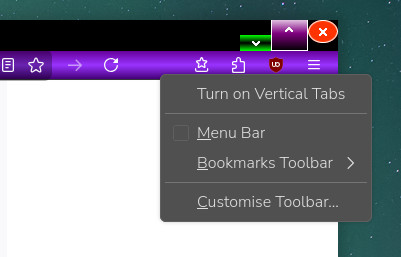
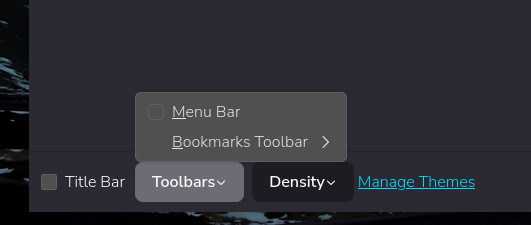
Modified by amoun
I've never been able to get any response to clicking on the bar next to the address bar. Never had any luck with the Alt key, or going into Firefox settings, either. At this point, all I get is either the bar shows up or it doesn't. What's the burger menu?
Modified by nmbourne
'I've never been able to get any response to clicking on the bar next to the address bar.'
You have to ensure it is a space to the left or the right.
The burger is the three horizontal lines, usually top right. i.e. a bun with a filling
Modified by amoun
Hi, Amoun, I really appreciate your trying to help with this issue. Nothing that's been suggested in this thread worked, but the menu bar has remained present for about a week now so maybe restarting my laptop helped. Now I have a big problem with Adobe suddenly not working :-( Hoping the menu problem has been fixed. Thank you. Nicola