


Windows 10 reached EOS (end of support) on October 14, 2025. If you are on Windows 10, see this article.

Search Support

Avoid support scams. We will never ask you to call or text a phone number or share personal information. Please report suspicious activity using the “Report Abuse” option.

Learn More

My Firefox profiles have disappeared and I cannot even open Firefox.

  • Atsakymų nėra
  • 1 has this problem

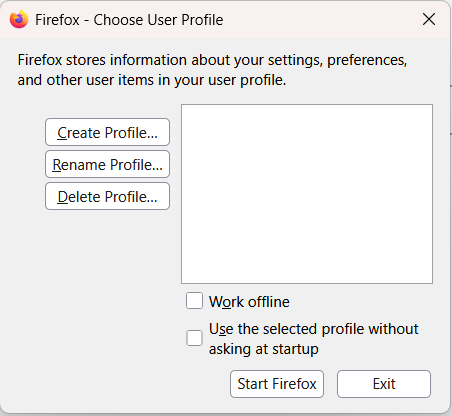
The last 2 days when I have shut down my computer then restarted, my Firefox profile has disappeared, along with all my bookmarks, passwords etc. I spent several hours yesterday following all the advice here to get everything back, but nothing worked. I had to create a new profile and then import an old passwords file, which I luckily had saved in Excel. This morning when I switched the computer on, the same thing has happened. I cannot even open Firefox without creating a new profile. I get a pop up box (screenshot attached), which shows no profiles, and i have to create a new one to even open Firefox. Every time I close out of Firefox and want to go back in, I am asked to choose a profile. This has never happened before.Before i give up forever on Firefox and go over to another browser, do you have any ideas how i can stop this from happening, and get my original profile, passwords, bookmarks etc back? Thanks.
The last 2 days when I have shut down my computer then restarted, my Firefox profile has disappeared, along with all my bookmarks, passwords etc. I spent several hours yesterday following all the advice here to get everything back, but nothing worked. I had to create a new profile and then import an old passwords file, which I luckily had saved in Excel. This morning when I switched the computer on, the same thing has happened. I cannot even open Firefox without creating a new profile. I get a pop up box (screenshot attached), which shows no profiles, and i have to create a new one to even open Firefox. Every time I close out of Firefox and want to go back in, I am asked to choose a profile. This has never happened before.Before i give up forever on Firefox and go over to another browser, do you have any ideas how i can stop this from happening, and get my original profile, passwords, bookmarks etc back? Thanks.
Pridėtos ekrano nuotraukos

You must log in to your account to reply to posts. Please start a new question, if you do not have an account yet.