


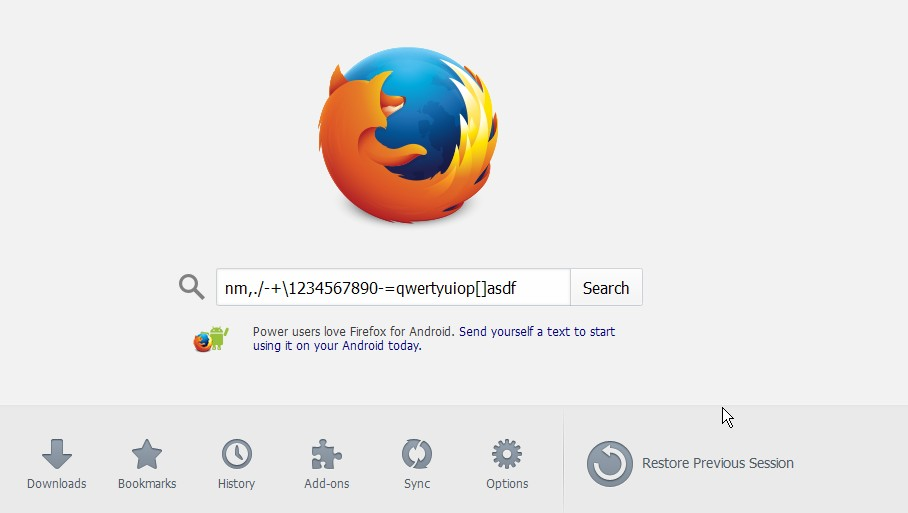
while typing random numbers letters appear

when typing on FF this happens ..the only key i have pressed is B. Is this because Java will not update for windows XP ...When using OPERA my typing is OK as i am now I have opened in SAFE MODE still does it.
All Replies (2)
Please update your graphics driver, there is an error for it in your about:support information.
I do not know if it is Java, however if you try a new profile after updating your driver information, does this still happen?
Please also make sure that all of your plugins are up to date: Troubleshoot issues with plugins like Flash or Java to fix common Firefox problems
Start Firefox in Safe Mode to check if one of the extensions (Firefox/Tools > Add-ons > Extensions) or if hardware acceleration is causing the problem.
- Switch to the DEFAULT theme: Firefox/Tools > Add-ons > Appearance
- Do NOT click the Reset button on the Safe Mode start window
- https://support.mozilla.org/kb/Safe+Mode
- https://support.mozilla.org/kb/Troubleshooting+extensions+and+themes
What security software (firewall, anti-virus) do you have?
Some security software like Comcast Constant Guard (Keystroke protection or Anti-Keylogging) has been reported in the past to cause such issues.