


Bringing back the old way of sorting History?

Is there any way to bring back the previous version of history that's sorted by most visited?
Like, why bring over the other sorting methods but not this one?
I know there are people that are going to be "well, why don't you bookmark the sites that you keep going to"? Because I prefer it this way. My history is my "second bookmarks" list in a way since my normal bookmarks are bloated and cluttered enough as it is.
모든 댓글 (3)

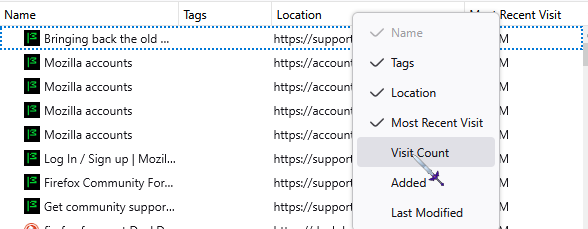
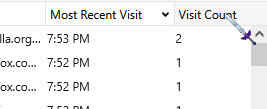
If you're specifically talking about firefox on desktop, looking at the manage history window there does seem to be a way to still do this!
Right click on the toolbar in that window You can select "most visited" And just click on visit count to list by visits.
Hope this helps!
AmikoPan said
If you're specifically talking about firefox on desktop, looking at the manage history window there does seem to be a way to still do this! Right click on the toolbar in that window You can select "most visited" And just click on visit count to list by visits. Hope this helps!
That's at least a good temporary solution. Thanks.
Now I'm hoping for a solution for the sidebar.

lowe23, an employee has said that they do not intend to include all the original sorting options in the new history sidebar, so it is possible that "Most Visited" will not re-appear.
However, you can create your own "Most Visited" smart bookmark, which should give you a similar dynamic list of the most visited websites, except that this will be located under bookmarks rather than history.
(This approach might not be preferable to having the list in the history sidebar as it originally was, but it is a possible workaround for those who want the dynamic list back.)
To give this a try:
Right-click inside any bookmarks folder (for example the Bookmarks Toolbar) and select "Add Bookmark". Give the new bookmark a name (such as "Most Visited"), and in the URL field enter: place:queryType=0&sort=8&maxResults=10
After saving the new bookmark, you might need to restart Firefox for it to take effect, but once it does, you will now have a folder named "Most Visited" in the selected location, which shows an up-to-date list of the 10 most visited websites.
Note, if you want to see a different number of results than 10, adjust the "maxResults" value accordingly.
글쓴이 TechHorse 수정일시