


Firefox is asking for a USB security code that I[ve never had!!!!!

Having trouble signing into Microsoft Hotmail because Mozilla will not allow anything else but a USB security code that I don't have!!!!!
모든 댓글 (7)
The options come from the site. You'd need to find some button on the login page to put you through a different login method.
That answer is somewhat like "if your Lap Top is Grey then find the button to turn it Blue" aside for the fact that Mozilla will not allow any other option!!!!
I'm not familiar with Hotmail. Sorry. You may need to ask Microsoft support for how to proceed.
(The browser only does what it's instructed to by the site. It can't "make up" its decisions.)
If you want to turn the whole Webauthn functionality off, there are steps to potentially follow digging into the browser internals, but if that will persuade Hotmail to stop requesting that is completely up to them.
I don't have the faintest Idea what your talking about. I'm sure if I did I'd have it fixed already.
Well the end–user way would be to try open a new Private Window, which shouldn't have any of your potential account preferences on Hotmail, and see if you can sign in that way.
The advanced way if you don't have any use for that technology is to disable it from the browser:
in hopes the sites would see that as a signal to stop trying to request these from you. Your mileage may vary. The site operator would know better.
"The options come from the site. You'd need to find some button on the login page to put you through a different login method." Dude, the message says it comes from FireFox. I'm getting it on X Money
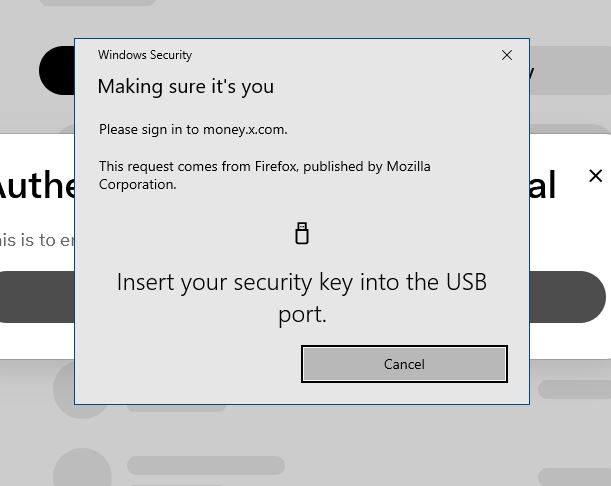
"Dude", the Windows Security dialog shows which app (entitled to these authentications, signed by which company) — not what site requested it — as whatever credential you present from the system will necessarily needs to be passed to the app — so in the dialog you acknowledge you're not passing the credentials to some rando script kiddo hijacking your device, but a legitimately signed browser.
The dialog doesn't mean Mozilla is making that authentication up. That dialog means you're OK your Windows will provide the credential to the app enumerated there, to pass that on, presumably to the URL also listed in the request.
(For the actual W10 issue not offering other means of WebAuthn, following up in support.mozilla.org/questions/1618338 …)
글쓴이 jbr 수정일시