


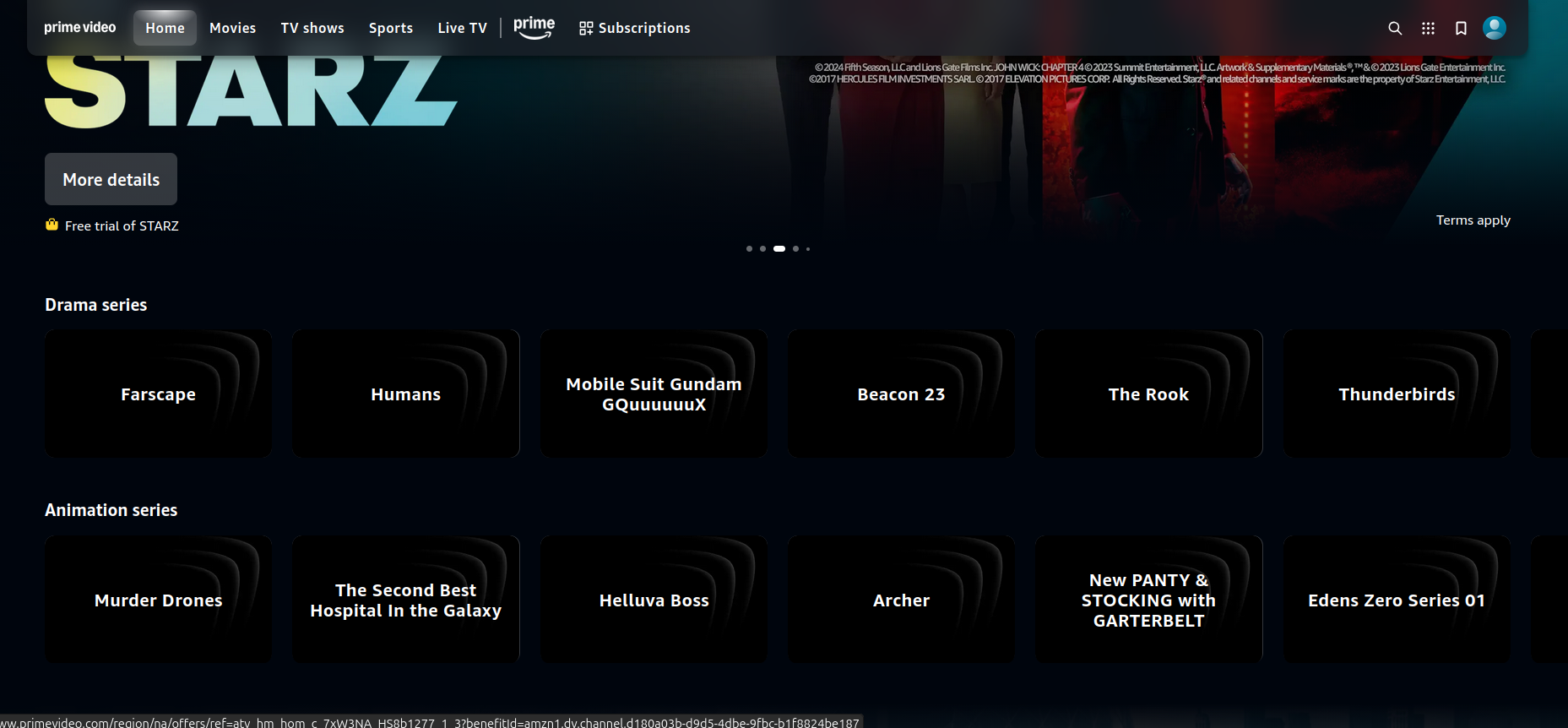
Since last April 2026 update Prime Video no longer displaying thumbnails of shows/movies

Since a few days (last week of April), when I go to Amazon Prime Video, once I log in, the thumbnail no longer display (see attached screenshot). However, when I arrive on Prime, before logging in, the thumbnails are there (but they might be actual images and not thumbnails). As soon as I log in, all thumbnails disappear and all I have is a text (might be the Alt-Text option for images).
It was working fine over the past weekend. I had a Firefox update at the beginning of the week. I think it somehow messed up my settings.
I tried several things: - clear cash (it clears everything when I close Firefox) - used different privacy settings (was at Strick) - added www.primevideo.com as exception in the privacy settings - was always use private window - had not installed any extension nor plugins - DMR was ON - most of every options were set to OFF or disabled
I tried to reinstall it through Snap Ubuntu 24.04 and it worked but the next day, the problem was back.
I installed Crome and out of the box, the thumbnails are there.
선택된 해결법
I exported my bookmarks. I deleted my profile. I created a brand new one. Logged back to Prime Video. Thumbnails were there. Started changing some settings. Shutdown PC. Next day, tried getting back to Prime Video. Thumbnails were still there.
So my problem is fix but I do not know what was the cause.
문맥에 따라 이 답변을 읽어주세요 👍 0모든 댓글 (3)
Hi,
Here are a couple of more things you can try:
- Clearing cookies and data for PrimeVideo (warning: you will be logged out on this website).
- Running Firefox in Troubleshoot Mode. If the problem doesn't persist, please follow the steps from this article to troubleshoot further.
- If nothing from the above helps, try also creating a new Firefox profile and check if the issue persists there. If it doesn't, you can start copying files from your old profile to the new one to identify which one causes the issue. See this article on what files to copy.
- Finally, if creating a new profile hasn't helped as well, please report the on WebCompat, so that our team there may be able to look into it. We'd also appreciate posting a link to your report here.
Looking forward to your update!
글쓴이 Denys 수정일시
선택된 해결법
I exported my bookmarks. I deleted my profile. I created a brand new one. Logged back to Prime Video. Thumbnails were there. Started changing some settings. Shutdown PC. Next day, tried getting back to Prime Video. Thumbnails were still there.
So my problem is fix but I do not know what was the cause.
You can check the Web Console (Tools -> Web Developer) for messages about blocked content and about the presence of mixed or unsafe content.
You can check the Network Monitor to see if content is blocked or otherwise fails to load.
If necessary use "Ctrl+F5" or "Ctrl+Shift+R" (Mac: Command+Shift+R) to reload the page and bypass the cache to generate a fresh log.