


I had to change my Hotmail password and your "Help" doesn't help me change it in TB

I have a Hotmail account and multiple gmail accounts. When I try following your (obscure) instructions for changing passwords, the box of passwords is only for my gmail accounts. None for my hotmail.
As Hotmail is very important to me, I'd like to keep accessing it through TB but you make it tough.
I am now not receiving my Hotmail mail and as I get too much traffic 200+ msgs a day, it will build. Please send simple, direct instructions on how to find and change the hotmail password, thank you.
모든 댓글 (9)
Usually, one can do this: - click settings>privacy&security - click savedpasswords and then showpasswords - then, highlight the rows for the account and delete them - that removes old passwords, so the account should then prompt for the new one.
To: david
Thank you for your response.
The only issue is, my Microsoft account/passwords don’t appear in that display. I have 3 Gmail accounts and 1 MS, hotmail account. The " Saved Logins" display shows 9 instances of passwords on 3 different dates, one group of 3 appears to be a Gmail generated password for each of the accounts "oauth" and one for imap/pop and one group for smtp. There is no mention of my MS account.
I set this up over a year ago and have been receiving email on all 4 accounts since then until yesterday when hotmail stopped working when I changed my password on MS demand.
What else can I do?
I had to change my Hotmail password and your "Help" doesn't help me change it in TB david Feb 17, 2026, 10:56:58 PM
Usually, one can do this: - click settings>privacy&security - click savedpasswords and then showpasswords - then, highlight the rows for the account and delete them - that removes old passwords, so the account should then prompt for the new one.
When you click the 'saved passwords' button, you should see lists of the active accounts, normally two rows per account. From your response, I infer you see something different.
Yes, you are correct, I see something else. Attached is a PNG of my logins w/o passwords and you can see there is no listing for my hotmail account.
Also, since yesterday, TB is not working normally. Meaning, I can only get updates by closing down the application and restarting. When I do restart (and whenever I highlight my Hotmail account) TB must send out a query to MS which generates an MS response that the login isn't correct and offers other ways to login. Meaning, my password isn't correct.
Could this call/response affect the updating function of TB for my other email accounts, i.e. gmail??
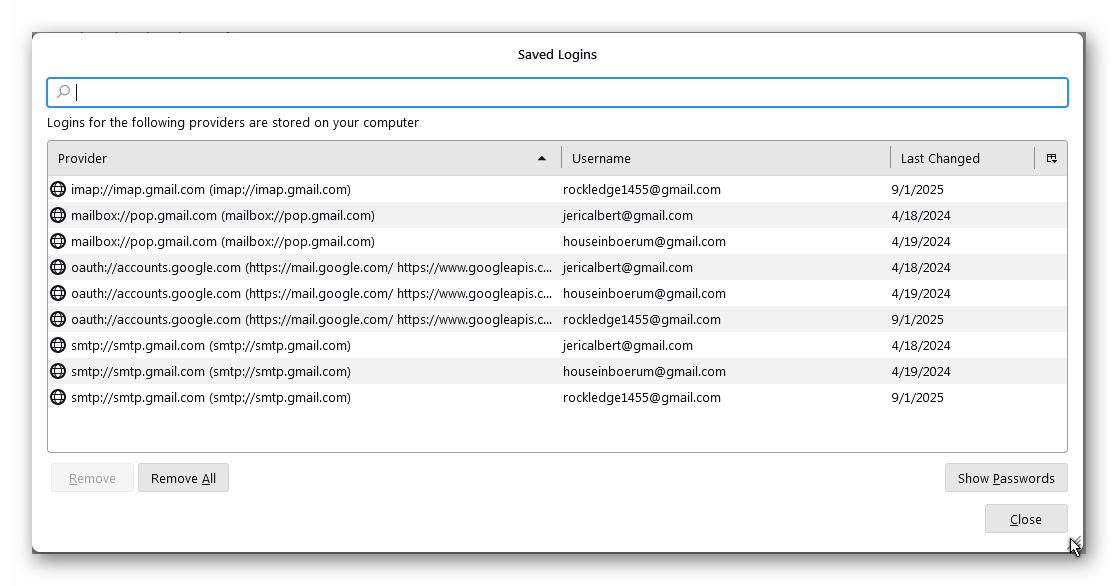
I will see if I can locate someone with Hotmail expertise. This is beyond me.
I have never heard of having to change a hotmail password 'on MS demand'. Also, if you never checked the box in the password prompt to save it, it wouldn't appear in Saved Passwords. But you should never see such a prompt if the authentication method is OAuth2 instead of normal password. For any OAuth2-supported account, such as hotmail and gmail, there should only be oauth:// entries in Saved Passwords, one for each account.
I suggest you check the authentication on the incoming and outgoing servers, and see if you can access the account in the browser with the new password.
"I have never heard of having to change a hotmail password 'on MS demand'. Also, if you never checked the box in the password prompt to save it, it wouldn't appear in Saved Passwords. But you should never see such a prompt if the authentication method is OAuth2 instead of normal password. For any OAuth2-supported account, such as hotmail and gmail, there should only be oauth:// entries in Saved Passwords, one for each account.
I suggest you check the authentication on the incoming and outgoing servers, and see if you can access the account in the browser with the new password. "
I had to change my password because I was using a device MS didn't recognize and I HAD FORGOTTEN my password and did not have access to a reminder or list.
The question I am asking is how do I change the password in Thunderbird for an email account that has been active for over a year, but because the mail company (i.e. Microsoft) has my new password now and not the one I used to set up the Thunderbird account for my Hotmail service.
The password list in TB doesn't list anything about Hotmail, only my Gmail accounts, but that is only an issue because I am trying to overwrite the existing password. Since the help information from TB says the only way to change the password is by editing that list, and my Hotmail service isn't listed, I'm stymied. If as you say, I never checked something to save it, then please tell me there is another way to change an active password other than editing that list, thank you.
If there's no entry in Saved Passwords (which you can't edit anyway with OAuth2), restart TB and enter the new password in the OAuth window that should appear on first connection (check first that the authentication is OAuth2). That will store an oauth:// entry in Saved Passwords (as long as cookies are accepted in TB Settings).