Bookmarks and new tabs

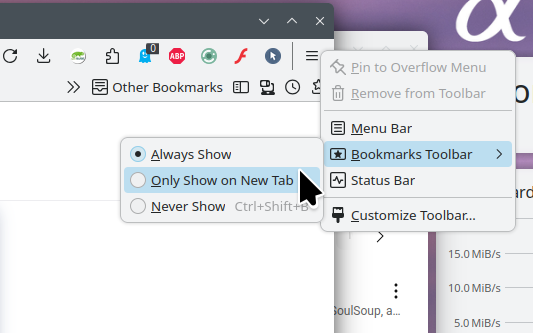
When using the new version of Firefox, I found that bookmarks only appeared in new tabs. Once I opened other web pages, there were no bookmarks above the screen, which made me feel inconvenient. Previously, the new tabs could also be customized, but now they can only be blank or the default pages of Firefox. So, can the new version of Firefox solve these problems? Or which of the older versions of Firefox can still meet my requirements?
모든 댓글 (2)
Hi
This support article should help:
https://support.mozilla.org/en-US/kb/bookmarks-firefox#w_bookmarks-toolbar
I noticed that you are using an older version of Firefox. I recommend that you update so that have the latest security and stability fixes. This support article should help;
https://support.mozilla.org/en-US/kb/update-firefox-latest-release

Sounds like you need to right click on the menu, then go Bookmark Toolbar, then Always show. see screenshot