

이 쓰레드는 보존되었습니다.
만약 도움이 필요하시면 새로운 질문을 올려주세요.

보존
New update - Firefox Nightly 137.0a1 - Help change settings

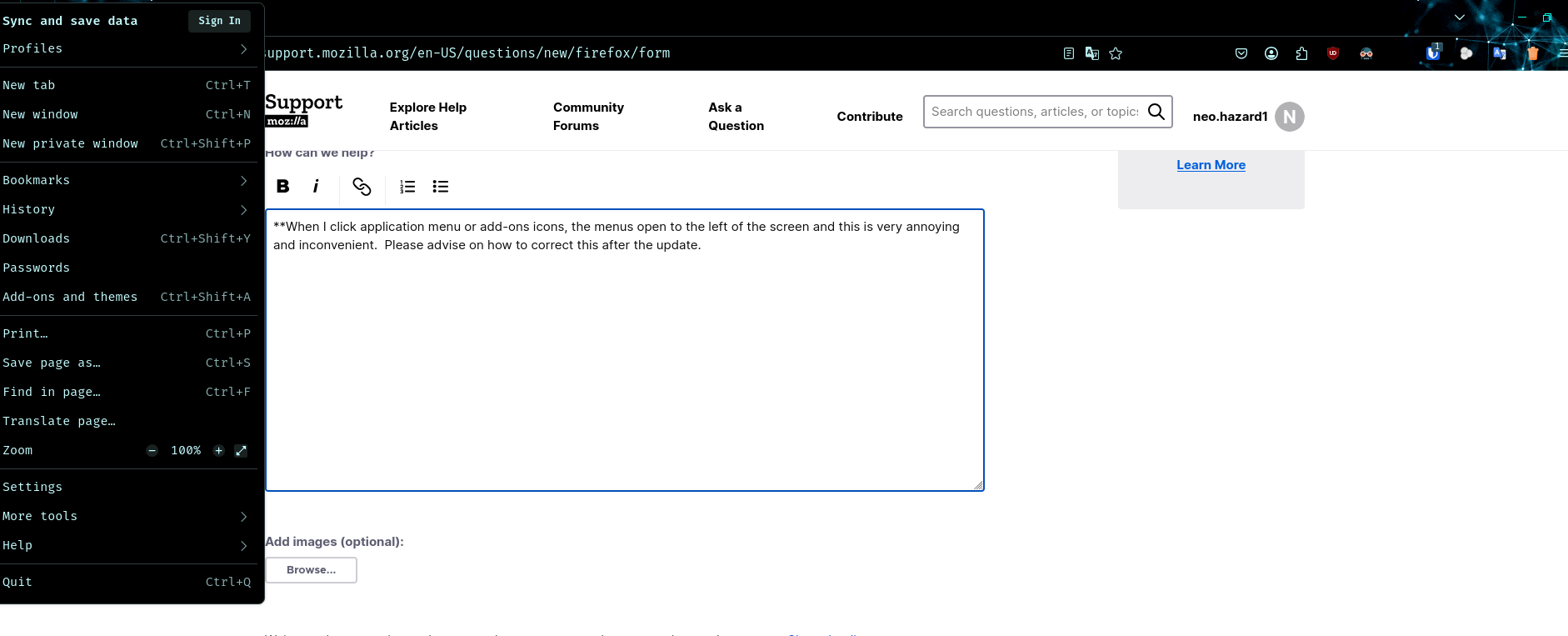
- When I click application menu or add-ons icons, the menus open to the left of the screen and this is very annoying and inconvenient. Please advise on how to correct this after the update.
**When I click application menu or add-ons icons, the menus open to the left of the screen and this is very annoying and inconvenient. Please advise on how to correct this after the update.
모든 댓글 (3)
Don't you use any custom userChrome.css file?
TyDraniu said
Don't you use any custom userChrome.css file?
Hello, not sure I am familiar with this feature you speak of, so I will assume I do not use anything of the sort.
All I know is after the recent update is when things changed and I did not find anything in the changelog that indicates my issue.

There was a bug in the nightly builds that was causing this and has now been fixed: https://bugzilla.mozilla.org/show_bug.cgi?id=1945834
Generally bugs do creep into nightly builds now and again. You can search on bugzilla for current bugs, or file a report there. You can also ask/discuss issues on the Matrix channel referenced at the top of the nightly release notes (https://www.mozilla.org/en-US/firefox/137.0a1/releasenotes/).