


FF 95.0.2 (64-bit) started to "eat" memory / CPU till it gets dead

Good day! Things were fine for years till the problem with my FF (95.0.2 (64-bit), Windows 7 64 bit) started ~two days ago. As it started it persists every time I try to us the FF. Because of this new non-disappearing problem I had to move to Chrome instead.
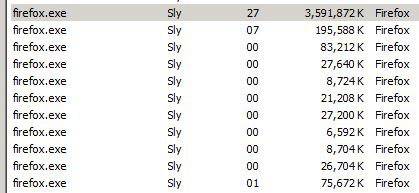
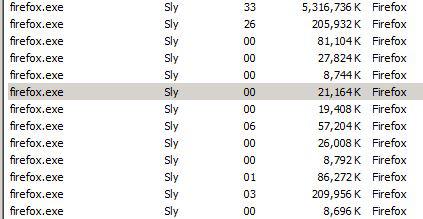
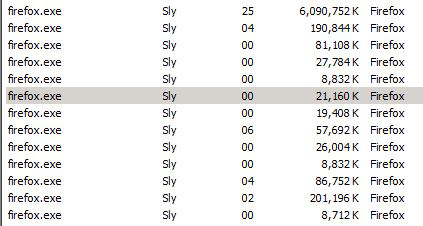
As soon as my FF is opened and even when it has only one tab with no activity inside, its memory usage starts to grow rapidly and in a matter of minutes comes from ~900MB to ~6GB+ with the CPU usage "balancing" between ~25-45%. If I browse the used memory value grows a bit faster.
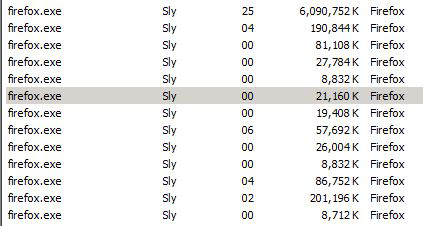
Along with that: - When the FF memory usage comes to ~85% of my memory, the FF browsing fails showing symptoms similar to a network issue (the network at the time is fine). - When the FF is closed, its processes are left along with their memory utilization keeping the same high rate till the FF processes are killed manually. - No add-ons / extensions or anything else were installed for months.
Please, assist in solving this sudden problem.

모든 댓글 (4)
Comments about the screenshots.
- 1 - FF starts
- 2-#4 - FF memory usage grows / CPU usage is 25-45%
- 5 - FF is closed, but its processes are still there (till killed manually) and still eating lots of memory (~5+ GB).
Screenshots were taken with the time interval of ~2 minutes between each one.

Start Firefox using Troubleshoot(Safe) Mode {web link}
A small dialog should appear. Click Start In Troubleshoot(Safe) Mode (not Refresh). Is the problem still there?
https://support.mozilla.org/kb/Firefox+is+already+running+but+is+not+responding
https://support.mozilla.org/en-US/kb/firefox-slow-how-make-it-faster
https://support.mozilla.org/en-US/kb/firefox-uses-too-many-cpu-resources-how-fix
https://support.mozilla.org/en-US/kb/firefox-uses-too-much-memory-ram
https://support.mozilla.org/en-US/kb/firefox-hangs-or-not-responding
Pilot Pirx said
- When the FF is closed, its processes are left along with their memory utilization keeping the same high rate till the FF processes are killed manually.
Are you closing the browser like this; Windows: Menu > File > Exit Mac: Menu > Firefox > Quit Firefox Linux: Menu > File > Quit
You can check the Firefox Task Manager (about:performance) and about:memory and about:processes pages.