

이 쓰레드는 보존되었습니다.
만약 도움이 필요하시면 새로운 질문을 올려주세요.

Solved
보존
Windows 11 Minimize/Maximize Buttons Missing (Tablet Mode?)

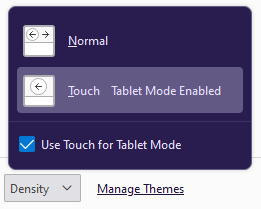
My minimize/maximize buttons have suddenly gone missing. I found other answers on this site that say Tablet Mode is the culprit; indeed, the density settings within Firefox are telling me Tablet Mode on.
However, tablet mode was officially removed in Windows 11. It's not in the settings, it's not in the Control Panel, and registry edits don't seem to work either. So what's going on here? A regression? How do I get my minimize and maximize buttons back?
My minimize/maximize buttons have suddenly gone missing.
I found other answers on this site that say Tablet Mode is the culprit; indeed, the density settings within Firefox are telling me Tablet Mode on.
However, tablet mode was officially removed in Windows 11. It's not in the settings, it's not in the Control Panel, and registry edits don't seem to work either. So what's going on here? A regression? How do I get my minimize and maximize buttons back?

모든 댓글 (1)
선택된 해결법
This is a known issue in Nightly on Windows 11 and should be fixed in the next update later today.
- /questions/1354128 Minimize and resize window buttons are gone.
- http://forums.mozillazine.org/viewtopic.php?f=23&t=3080885
- 1735961 - Stuck in tablet mode in windows 11 (No minimize or maximize buttons)