


Unable to get youtube homepage displayed properly and unable to get youtube videos to play from youtube website. I can play them from other sites though?

Hello there,
Thanks in advance for taking the time to help me out. A few days ago, as I was using youtube, it suddenly shifted into the wierd layout in the pic attached. It refuses to play any videos but ironically, when I play them from other websites (like facebook) , they just play just fine. Can anyone help me out please?
모든 댓글 (5)
Sorry, the pic was not attached before. Here it is:
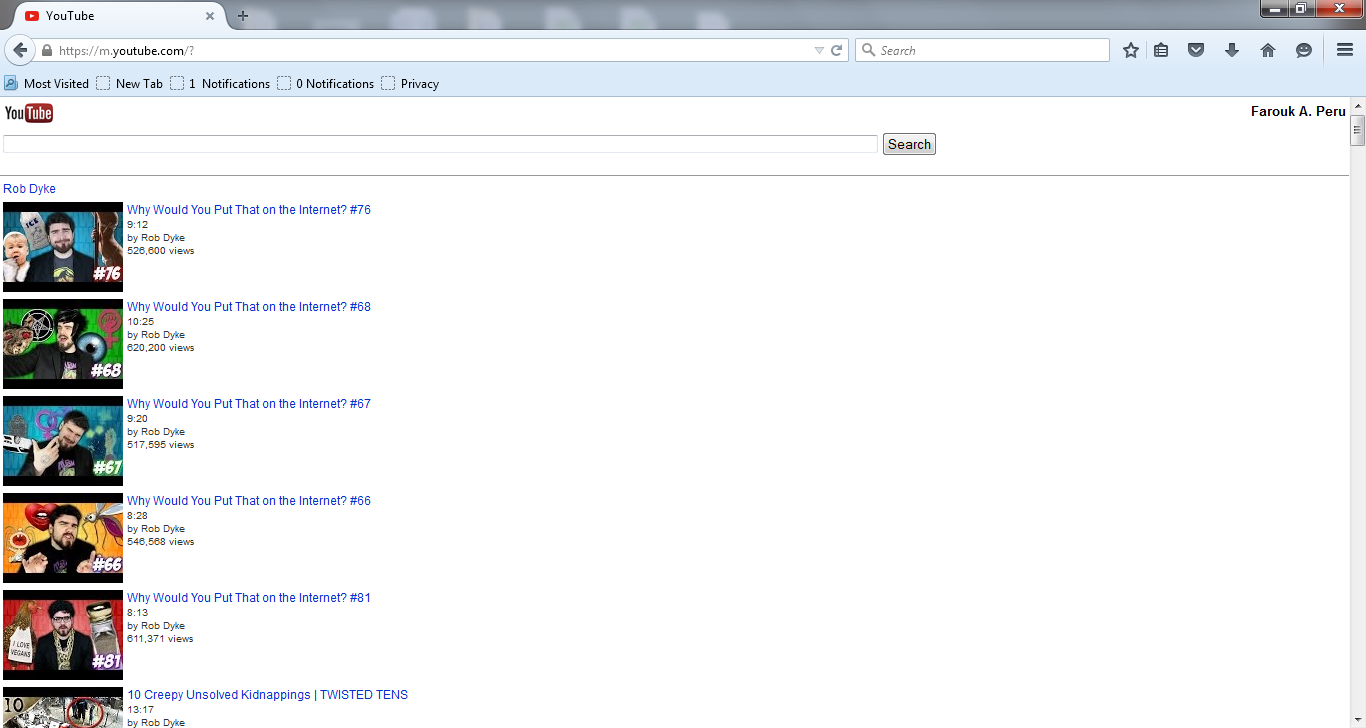

Farouk_ said
Hello there, Thanks in advance for taking the time to help me out. A few days ago, as I was using youtube, it suddenly shifted into the wierd layout in the pic attached. It refuses to play any videos but ironically, when I play them from other websites (like facebook) , they just play just fine. Can anyone help me out please?
Hi,
this question was already asked before. Here's how to fix your problem: https://support.mozilla.org/de/questions/1024537
Cheers!
Regards, Tobias
You can try these steps in case of issues with web pages:
You can reload web page(s) and bypass the cache to refresh possibly outdated or corrupted files.
- Hold down the Shift key and left-click the Reload button
- Press "Ctrl + F5" or press "Ctrl + Shift + R" (Windows,Linux)
- Press "Command + Shift + R" (Mac)
Clear the cache and remove cookies only from websites that cause problems.
"Clear the Cache":
- Firefox/Tools > Options > Advanced > Network > Cached Web Content: "Clear Now"
"Remove Cookies" from sites causing problems:
- Firefox/Tools > Options > Privacy > "Use custom settings for history" > Cookies: "Show Cookies"
Start Firefox in Safe Mode to check if one of the extensions (Firefox/Tools > Add-ons > Extensions) or if hardware acceleration is causing the problem.
- Switch to the DEFAULT theme: Firefox/Tools > Add-ons > Appearance
- Do NOT click the Reset button on the Safe Mode start window
Guys, thanks so much for your time :)
It was solved by the simple act of clearing cookies. Sorry for the repeat question. I'd never have guessed it was because youtube thought my laptop was a mobile device! Have a great day!
F.
You're welcome