


Avoid support scams. We will never ask you to call or text a phone number or share personal information. Please report suspicious activity using the “Report Abuse” option.

Learn More
Open

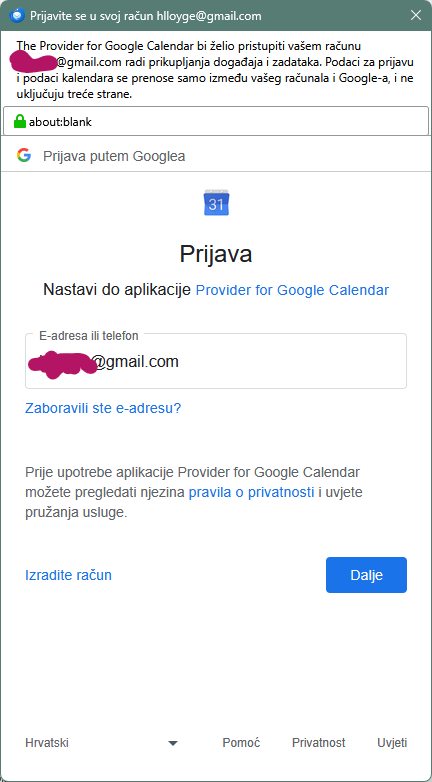
Whenever I start Thunderbird, Calendar asks to authenticate with my google account

hlloyge

Greetings all!

Thunderbird version is 1.52.0

Since this morning (8:00 CET) I have to enter password for my google calendar every time I start Thunderbird. No matter what authentication options I choose, calendar manager keeps asking me to authenticate. "Don't ask again" is turned on. Gmail is set up as OAuth for both incoming and outgoing servers, and it works fine.

Things I've tried since:

- Removed legacy connection in password manager, when I was using IMAP to connect to Gmail - Revoked OAuth permission from google account for Calendar and from Thunderbird password manager - Unsubscribed from calendars and added them again after restarting Thunderbird

I don't know what more to do. Also, I don't know what happened, really, as it worked properly last night.
Greetings all! Thunderbird version is 1.52.0 Since this morning (8:00 CET) I have to enter password for my google calendar every time I start Thunderbird. No matter what authentication options I choose, calendar manager keeps asking me to authenticate. "Don't ask again" is turned on. Gmail is set up as OAuth for both incoming and outgoing servers, and it works fine. Things I've tried since: - Removed legacy connection in password manager, when I was using IMAP to connect to Gmail - Revoked OAuth permission from google account for Calendar and from Thunderbird password manager - Unsubscribed from calendars and added them again after restarting Thunderbird I don't know what more to do. Also, I don't know what happened, really, as it worked properly last night.
Attached screenshots

You must log in to your account to reply to posts. Please start a new question, if you do not have an account yet.