


Potential Malware within Mozilla . . .

This morning when I logged into my computer and opened Firefox, I received pop-up after pop-up message warning me that my computer had been infected with 3 viruses. When I clicked on one of the pop-ups, it took me to where I would have to pay something like $160 to fix it.
I immediately ran a virus check on my computer which showed absolutely NO THREATS. Since I these messages do not appear unless my Firefox browser is opened, I believe it is malware that potentially has invaded Mozilla.
I am reporting this, asking that you fully check this out. I am VERY careful what I click or do not click, and my system says there is nothing. Please help.
Sincerely, Delann Conrad [redacted email from community support forum]
ჩასწორების თარიღი: , ავტორი: James
ყველა პასუხი (6)
For notifications from sites that were permitted to send these: support.mozilla.org/questions/1459930 please follow Web Push notifications in Firefox for the steps how to revoke the permissions you've previously granted.
Wow. This is your response. I have been a faithful Mozilla user for over 20 years! Very disappointed . . . extremely.
Yes, it has all the details for "fake virus" alerts and other scam content. Have you checked the link if the notifications appear the same as what you're seeing? The thread includes images.
If they don't look like this, please attach a screenshot of the scam content for assistance with your kind of malicious websites. (There's no "Malware within Mozilla", what you're seeing is dubious web content trying to trick you into actions. See support.mozilla.org/questions/1607381 for different kind.)
Plus there was no link -- it did not appear in the browser. It was a pop-up on my computer. Sorry I left that part out. I was really frazzled when it was happening.
It's just a fraud, and easy to unsubscribe from the source of these. (They just abuse harmless system functionality…) — Each of the notifications has the real site that's behind them (even though most of the time it's just some garbled burner site, but it's the origin nonetheless).
The actual notifications show you which site is pushing these: (orange emphasis mine)
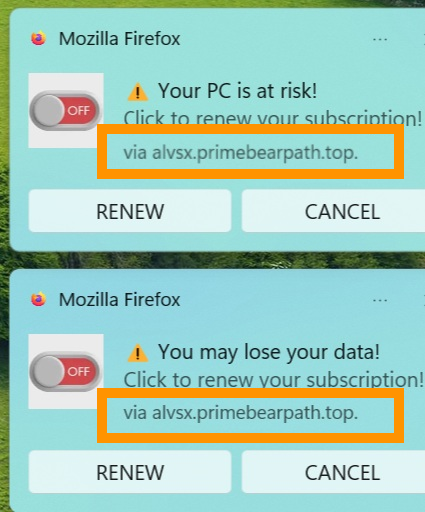

jbr's right, and that's probably why it looked like your computer. Firefox site notifications pop up in the Windows corner, so they look just like system warnings. Quickest fix is to type about:preferences#privacy in the address bar, go to Notifications > Settings and remove any site you don't recognise. And definitely don't pay that $160.