


Vertical sync screen tearing

Firefox version: 153.0.4 / Windows 11 25H2 26200.9168
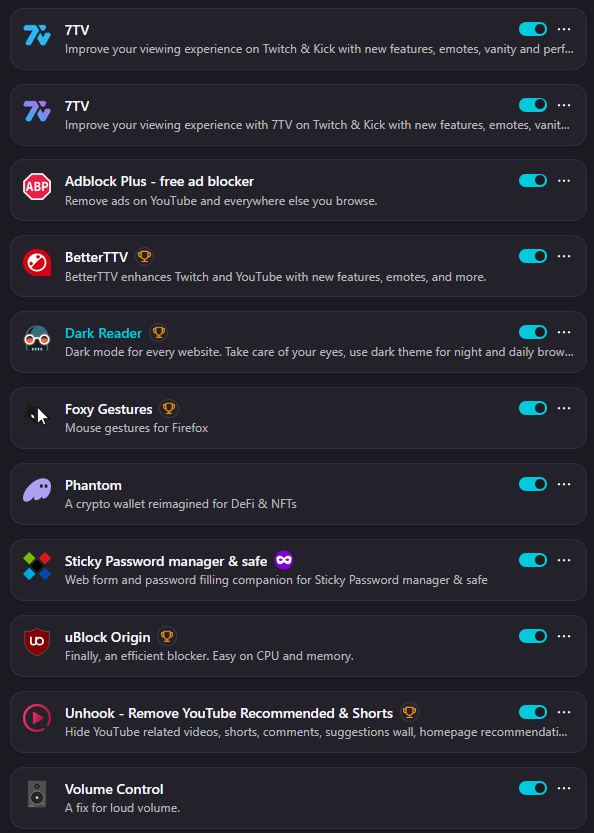
Attached are images showing the performance settings and the active extensions in case any of them proves to be responsible for the problem.
Yesterday I noticed a horizontal screen tear when scrolling down through sites like X(Twitter), YouTube, GMail, Reddit etc. I immediately checked my performance options and they were deselected. I activated them again, but this did not solve the problem, I also tried to active some layers in about:config but those were already activated. Checked Nvidia settings too, vsync is on, Edge is not affected, Chrome is not affected, even installed Waterfox to see if only Firefox-based browsers are affected, but that one was OK too.
Last resort was to refresh the Firefox installation from the uninstall utility. After the refresh and all settings/extensions got auto-reinstalled, the screen tear got fixed. I left the PC running over night and when I accessed Firefox again this morning, the screen tear problem was back. However, now, the performance options are disabled, and if I try to enable them and restart Firefox, the options get disabled again.
Would really appreciate it if anyone could provide a solution that does not involve refreshing Firefox daily.

ჩასწორების თარიღი: , ავტორი: xenocyde3000
ყველა პასუხი (3)
Figured out that the tearing disappears when the Nvidia RTX 4080 GPU is in use, then immediately reappears as the GPU utilization drops to near 0.
I'm sure this is not the best solution, but for now, I resolved the issue by activating "Prefer Maximum Performance" for power management mode in the Nvidia App.
Hello,
I am glad to hear that your problem has been resolved. If you haven't already, please select the answer that solves the problem. This will help other users with similar problems find the solution.
Thank you for contacting Mozilla Support.
Paul said
Hello, I am glad to hear that your problem has been resolved. If you haven't already, please select the answer that solves the problem. This will help other users with similar problems find the solution. Thank you for contacting Mozilla Support.
I haven't yet selected my answer as a solution because I'm waiting to see if others find a better solution. Mine is not exactly a power efficient one since it requires the GPU and VRAM to run at maximum clocks all the time, which is overkill for the sites I mentioned above.
ჩასწორების თარიღი: , ავტორი: xenocyde3000