


As of today, Firefox gets an "Access Denied" when accessing goddady.com. Chrome works.

Access Denied You don't have permission to access "http://www.godaddy.com/" on this server.
Reference #18.acf7d517.1771548295.4f66cee0
https://errors.edgesuite.net/18.acf7d517.1771548295.4f66cee0 is what I get when going to https:\goddady.com as of today. Running on Windows7 (no, I won't upgrade). Tried a variety of changes. But Chrome works fine. Any suggestions?
ყველა პასუხი (18)
Hi,
Thank you for reaching out! I've filed a WebCompat report for this. Let's see what our QA staff members there say.
Meanwhile, you can try using Chrome Mask for this website.
Just to note, it's most likely the website blocking Firefox 115 ESR based on the User-Agent string, a kind of issue we can't prevent from happening. We can fix it once it's confirmed, though.
Hm, ok, could you please try the following troubleshooting steps then:
- Please check if you have Enhanced Tracking Protection (ETP) enabled. You can do that by clicking the shield
 icon in the left part of the address bar.
- If ETP is enabled, try disabling it.
- If the problem is not fixed, try clearing Firefox cache.
- If it does not help, try clearing cookies and data for the website you experience troubles with (warning: you will be logged out on this website).
- If it also does not help, try running Firefox in Troubleshoot Mode. If the problem doesn't persist, please follow the steps from this article to troubleshoot further.
- If nothing from the above helps, try creating a new Firefox profile and check if the issue persists there. If it doesn't, you can start copying files from your old profile to the new one to identify which one causes the issue. See this article on what files to copy.
Does any of the above help? Looking forward to your update on how it goes!
First, it turns out that Chrome mask is not accepting any website inputs, so that does not work. I tried the others with no luck.

This problem relates to many commercial sites: Home Depot, Lowe's, Costco, and many other. But it doesn't affect most grocery and and general merchandise stores (Walmart, Target, etc).
You don't have permission to access "http://www.lowes.com/Search=snow%20shovel" on this server. Reference #18.1c9533b8.1771790334.13ea45f9 https://errors.edgesuite.net/18.1c9533b8.1771790334.13ea45f9
This happened after a recent update. The current version is 115.32.1esr.
None of the steps recommended by Denys helped. This does occur for a new clean profile.
It's not related to the IP address because these sites can be accessed from other devices on the same home network that use different versions of Firefox.
Some person mentioned that "Reference 18" means the website is using an Akamai CDN and Akamai has either rate-limited requests from what it thinks are "you," or it thinks you're a bot.
ჩასწორების თარიღი: , ავტორი: vd10314-vlad
lyleleverich said
no, Chrome mask did not work
I've just realized that you have to clear cookies and data for that website first, and enable Chrome Mask. (Because once you get the error message the info about blocking you seems to be stored somewhere in cookies.) Does that work?
As I said, Chrome mask is installed, but is not accepting website inputs. I enter "www.godaddy.com" in the field to save sites, hit return, but it never shows up as a saved site and will not activate on that page.
lyleleverich said
As I said, Chrome mask is installed, but is not accepting website inputs. I enter "www.godaddy.com" in the field to save sites, hit return, but it never shows up as a saved site and will not activate on that page.
You should be able to just toggle the switch while visiting the website. See the screenshot.
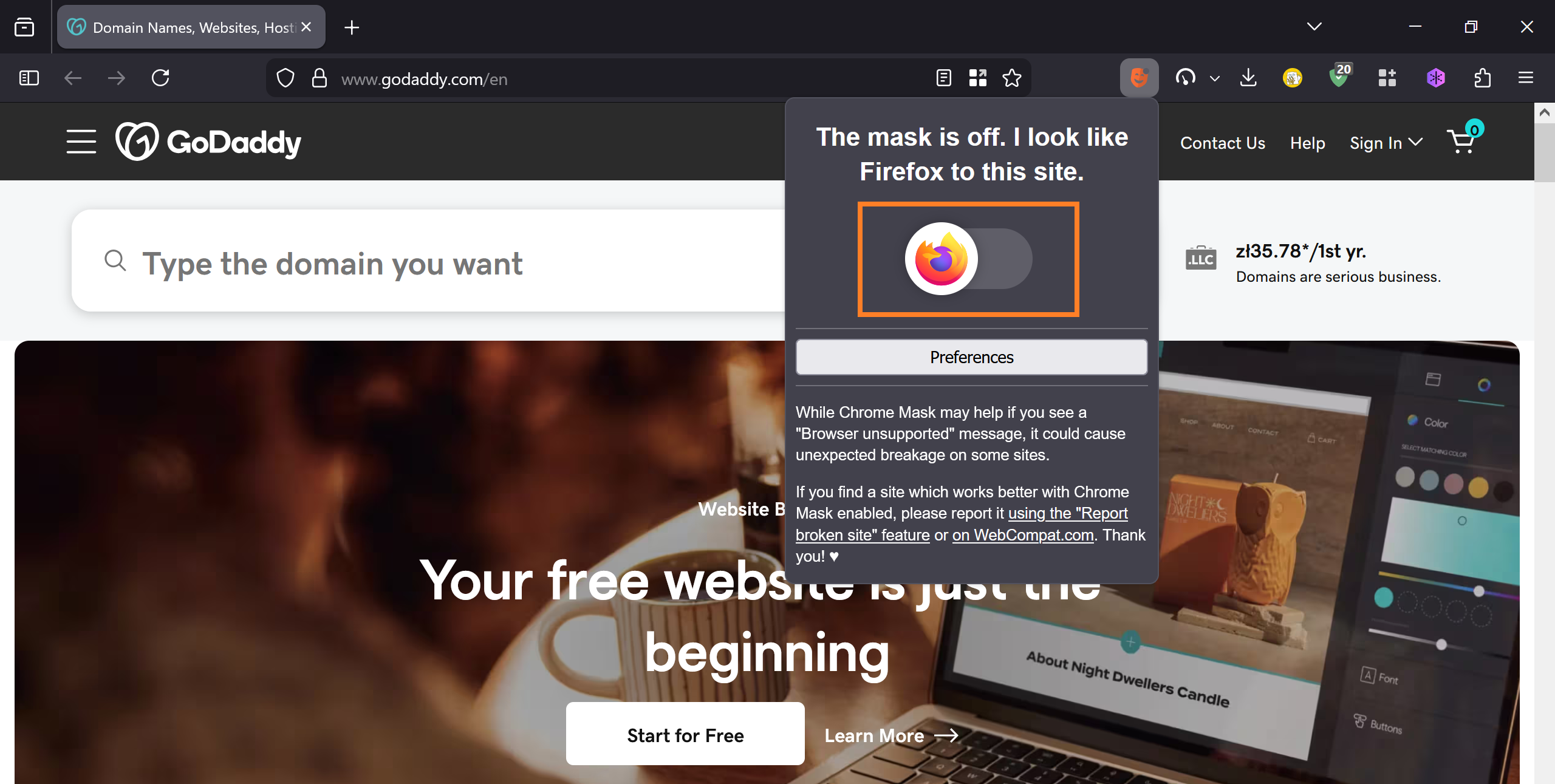
yes, it will toggle on from the mask icon. But I still get "Access denied"

Greetings,
I don't know if my problem started on February 19, 2026, as was the case with the OP, and I certainly don't (directly) use Godady, but I'm having similar issues that I started noticing around the same date.
So far, ordering pages on the websites of Walmart* and Vitacost don't work with either Firefox 115.33.0esr (64-bit) or pre-Chrome Edge Version 109.0.1518.140 (Official build) (64-bit), and accessing most of the website for Bestbuy* doesn't work either. For example, the login/guest page for Vitacost displays an error message almost exactly identical with that reported by lyleleverich, i.e.:
   Access Denied
   You don't have permission to access "http://www.vitacost.com/MyAccount/Login.aspx?" on this server.
   Reference #18.7018d017.1772340915.f93f2221
   https://errors.edgesuite.net/18.7018d017.1772340915.f93f2221
N.B. The above error is identical with both Firefox 115.33.0esr (64-bit) and Edge Version 109.0.1518.140 (Official build) (64-bit), both running on the last non-garbage version of Windows, Windows 7 Pro (64-bit) (Service Pack 1).
Anyone wishing to duplicate the problem can go to
https://www.vitacost.com/MyAccount/Login.aspx?target=/
click on the "our Guest" link in the sentence "Don't want to register? Continue your order as our Guest.", and bob's your uncle.
Given that this problem occurs on two elderly browsers, but not on a third elderly but not too elderly browser, and given that the problem seems to have occurred recently, I assume the problem has to do with some sort of incompetent web filtering technology incompetent retailers have begun implementing incompetently. I'd welcome a more astute analysis. An solution would be an unexpected, but most appreciated, bonus.
Thanks in advance.
Outis
- You can't imagine how embarrassed I am to have to publicly admit that I've tried to visit Walmart and Bestbuy. How declasse! Oh, how the unmighty have fallen! Woe is I! ;-(
Unfortunately, more and more websites are starting to drop Windows 7 support. What you can try is changing the browser User-Agent with add-ons like Chrome Mask or User-Agent Switcher and Manager.
Dear Denys,
User-agent switchers don't seem to work anymore, as well as Chrome Mask. All these imitations cannot pass authentications anymore. Some websites, such as Chase.com, stopped working with this ESR version awhile ago, but they didn't accept Chrome on Win 7 even before. This didn't affect any commercial sites though. This particular problem manifested after a recent Firefox update (less than a month ago).
You wrote:
It's most likely the website blocking Firefox 115 ESR based on the User-Agent string, a kind of issue we can't prevent from happening. We can fix it once it's confirmed, though.
Have you confirmed the issue or are going to do it? Are you going to implement a fix to allow to change the user-agent string if indeed this causes this problem or whatever needs to be done?
vd10314-vlad, to clarify, I'm not a developer unfortunately.
Please also note that ESR 115 support ended on February 28. So there won't be any further updates.
I'd love to confirm the issue, but I don't have access to my machine with Windows 7. So all I can do is guessing and asking you to check... which doesn't really work as we can see.
Dear Denys,
If there won't be anymore updates, is there a way to roll back to an older version of Firefox 115, probably mid-February, before this issue with multiple unavailable sites came up.
Also, it would be very helpful if you shared how to manually change the user-agent string on Firefox.
Best regards, Nekto
Dear Denys,
Thanks for your input.
The problem seems to be due to some sort of incompetence somewhere. While "incompetence" and Windows" are all but synonyms, it isn't obvious to me how Windows 7 is to blame. If, for some bizarre reason, the owners of the various websites mentioned didn't want to accept money from people using Windows 7, surely they could have their websites report something like "We detected you are using Windows 7. Screw you, we won't deign to take your money! Get lost, we have callow yooths waiting to be rooked!" Instead these websites aren't complaining about Windows 7; they're just working badly.
(Omitted for brevity is a essay I could write on how one's use of operating system or web browser should be of no concern to any website. You're welcome. ;-)
Regarding this being a Firefox ESR issue, as I mentioned previously, pre-Chrome Edge has also been broken by these websites. I posted the issue here on the theory that some here might be in-the-know about such matters, not as a complaint about Firefox per se (though it is hardly free of other compatibility issues).
Has anyone positively determined *exactly* what the nature of these problems are?
Thanks.
Bonus Info: The following were of no help to me, but might be of help to others:
Edgesuite.net Access Denied Error When Visiting Web sites https://leinss.com/blog/?p=3409
Fix errors.edgesuite.net Access Denied (Reference #18) – Router/ISP Troubleshooting https://en.ittrip.xyz/windows/troubleshooting/edgesuite-access-denied
ჩასწორების თარიღი: , ავტორი: Outis

Chrome will not update to the latest version, They stopped supporting W7. Tried the cookie cache deal with no luck. My machine will not handle W11.