Slow loading

Going to ANY website, it takes "forever" to load, but after loading normal speed is experienced. One way to get a website to initially load more quickly is to click the "X" which the spinner is going endlessly, then refresh the page, whereupon it will usually load instantly.
The problem is experienced with any and every website. This problem does not occur with Chrome or Edge:
Windows 11, Firefox 142.0.1 64 bit.
ყველა პასუხი (2)
"...click the "X" WHILE the spinner is going ...

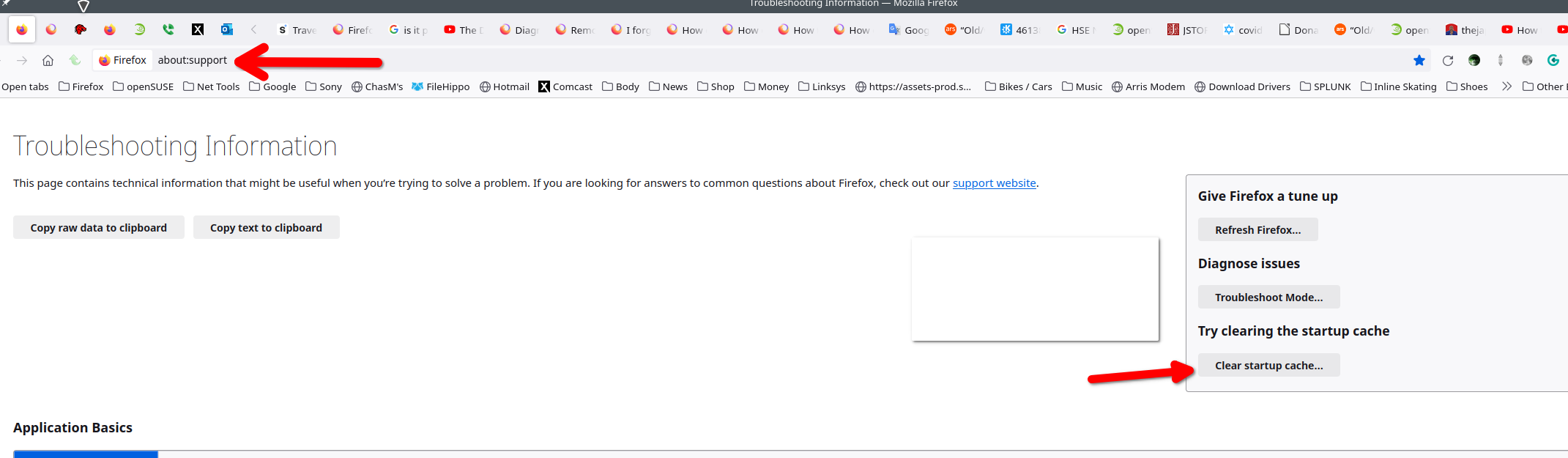
Did you clear the startup cache? see screenshot Did you try with Firefox in Troubleshoot Mode? https://support.mozilla.org/en-US/kb/diagnose-firefox-issues-using-troubleshoot-mode#w_how-to-start-firefox-in-4troubleshoot-modesf5safe-modesf
Did you clear your browser cache? https://support.mozilla.org/en-US/kb/clear-cookies-and-site-data-firefox
What is your dns setup in the computer, browser, and router?