


Windows 10 reached EOS (end of support) on October 14, 2025. If you are on Windows 10, see this article.

Avatar for Username

ძიება მხარდაჭერაში

ნუ გაებმებით თაღლითების მახეში. აქ არავინ უნდა მოგთხოვოთ ტელეფონზე დარეკვა, შეტყობინების გაგზავნა ან პირადი მონაცემების გაზიარება. რამე საეჭვოს შემჩნევისას გთხოვთ გვაცნობოთ „დარღვევის მოხსენებით“.

ვრცლად
დაარქივებული

Firefox jump lists

zeroknight პასუხგაცემული
firefox2653

I apologize for not knowing where to put this question. I have the latest version of Firefox installed and pinned to my taskbar. When I right-click on the Firefox icon that's pinned to my taskbar a list of things that I've downloaded as well as some other things shows up. Now I understand that I can manually clear these items, but that's a pain. I searched online for an answer and through my researching found that these items are called jump lists. I then searched for a solution for how to disable them and followed the instructions I'd found on a majority of sites that provided a solution. Even after doing this the jump list is still enabled and I don't know where else to go. I have attached two pictures showing the steps I've taken and that the jump list is still active.
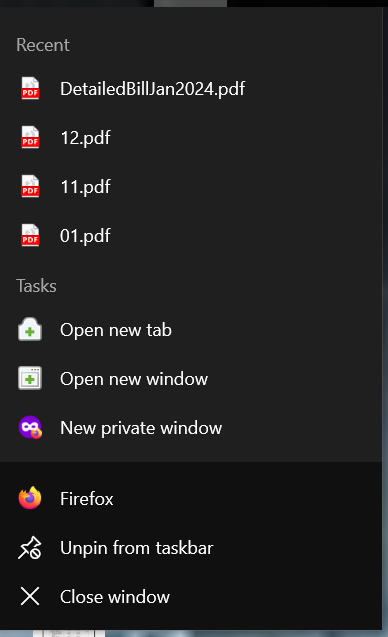
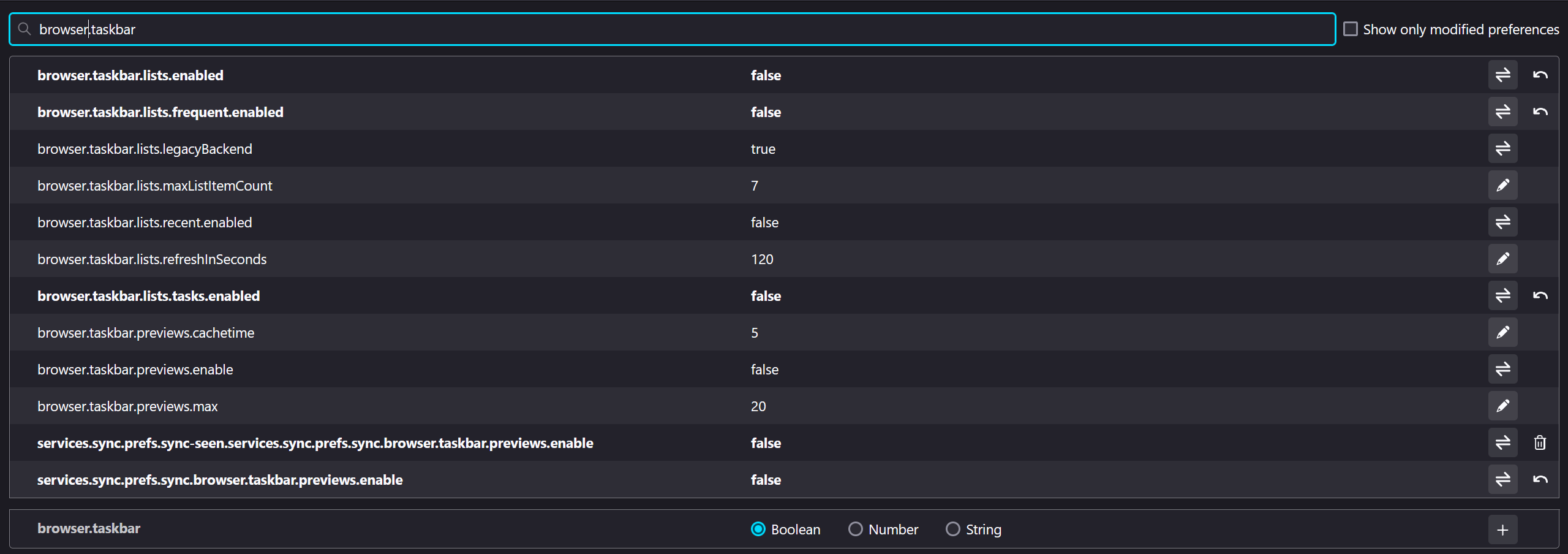
I apologize for not knowing where to put this question. I have the latest version of Firefox installed and pinned to my taskbar. When I right-click on the Firefox icon that's pinned to my taskbar a list of things that I've downloaded as well as some other things shows up. Now I understand that I can manually clear these items, but that's a pain. I searched online for an answer and through my researching found that these items are called jump lists. I then searched for a solution for how to disable them and followed the instructions I'd found on a majority of sites that provided a solution. Even after doing this the jump list is still enabled and I don't know where else to go. I have attached two pictures showing the steps I've taken and that the jump list is still active.
მიმაგრებული ეკრანის სურათები

ყველა პასუხი (1)

You can disable jump lists in Windows:

Settings > Personalization > Start > Show recently opened items in Jump Lists on Start or the taskbar and in File Explorer Quick Access