


I right-click/sort. Bookmarks split into 2 parts. No visible seperator. Top half bookmarks have black triangle. ??

How to get all bookmarks in the folder seperated, not in two halves?
ყველა პასუხი (3)
Please provide a screenshot of what's happening.
See this support article.
How do I create a screenshot of my problem?
It is best to use a compressed image type like PNG or JPG to save the screenshot and make sure that you do not exceed a maximum file size of 1 MB.
Then use the Browse .... button below the Post a Reply text box to upload the screenshot.
Thanks for reply :)

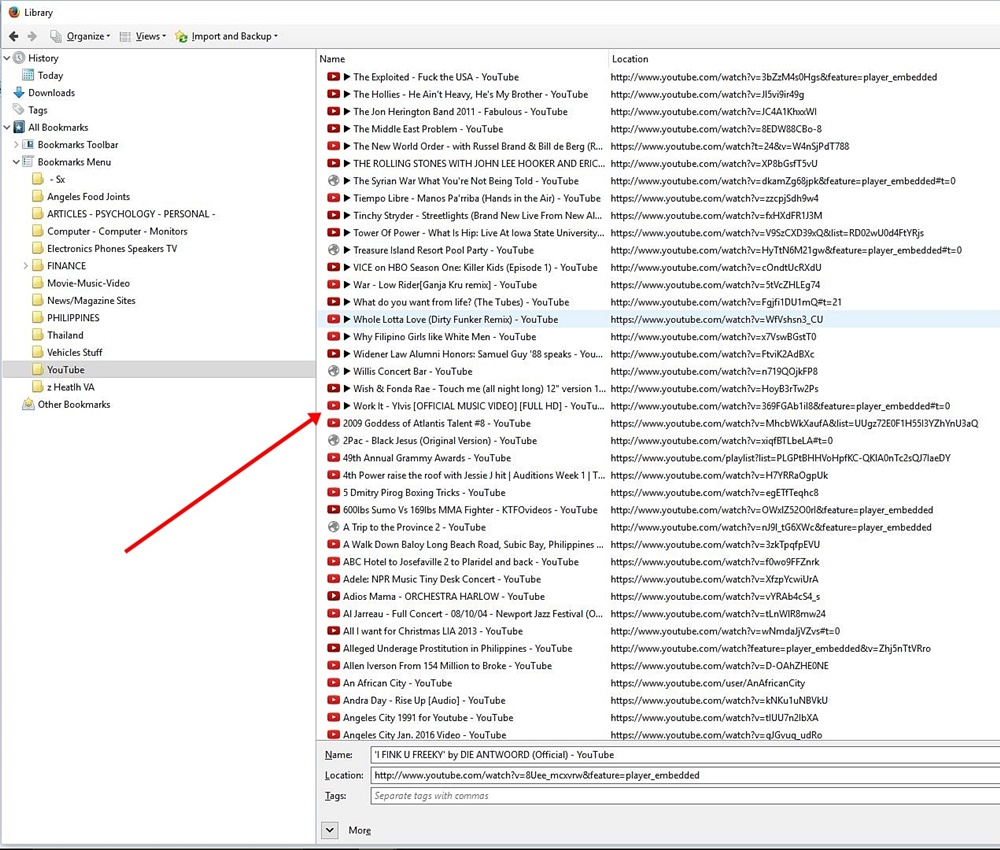
Still have the problem. Please see the attachment. The first 20 bookmarks in the folder have a black pointer/arrow. Those 20 items are sorted, then another sort starts. It's as though there is an invisible seperator there.
I still wish to sort all of the folder items alphabetically. or aphanumerically. Not like on the attachment. Any solutions? Thank you.