


I have an extraneous result in my awesome bar and can't remove it

When I begin typing in the awesome bar, I always get a particular result and I can't figure out how to remove it. It is not in my history, not in my bookmarks, I can't find it to remove it. Most annoningly, it is autocomplete suggestion so I have to consistently move around it.
It occurs everytime, as I type "read" - headed to Google Reader, but the autocomplete result is "readbility.com" though I can't find how to remove that.

選ばれた解決策
You can probably only get rid of such entries by deleting the places.sqlite file.
すべての返信 (5)
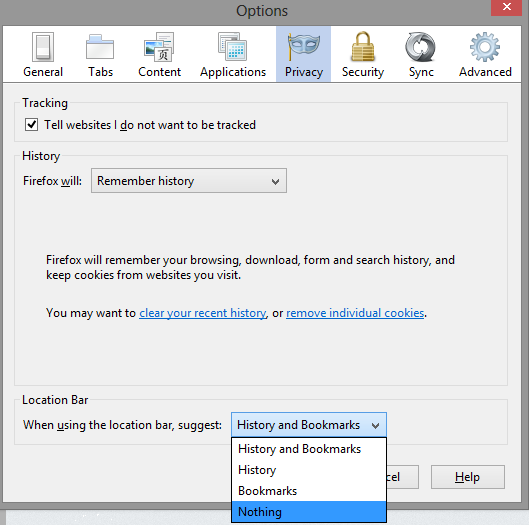
Go to options>Privacy>Location Bar drop down menu. There you can set what you see when you type in the awesome bar, such as bookmarks, history, nothing, or bookmarks and history together.
この投稿は user633449 により に変更されました
Does that entry appear in the list if you type more letters of that result?
Is that site bookmarked or otherwise visited or typed?
Use these steps to remove saved (form) data from a drop down list:
- Click the (empty) input field on the web page to open the drop down list
- Highlight an entry in the drop down list
- Press the Delete key (on Mac: Shift+Delete) to remove it.
You can check for problems with the places.sqlite database file in the Firefox Profile Folder.
No, I can't find that URL in the drop-down list ever. I tried ever combination of letters.
I've since found another example of this issue. Very frustrating since I don't visit the "default" site that Firefox is trying to force on me.
選ばれた解決策
You can probably only get rid of such entries by deleting the places.sqlite file.
Thanks for the pointer cor-el. I just queried for references to the site in the moz_places and moz_inputhistory tables of the places sqlite and removed them selectively. Fixed!
Small annoyance, but nice to solve it.
この投稿は jeffreypriebe により に変更されました