


Remember Usernames and Passwords
One website doesn`t remember or offer to remember my username and passwords. It doesn`t present the box "remember password" either. Sometimes after i have logged in and come back later the username and password will appear when i click on the login box, but most times i have to type the details in because it`s not remembered. Any suggestions? Do you have a fix?
選ばれた解決策
Hello again, i did a Google and found "How to Activate Auto Complete in Firefox 4" Even though i`m on Firefox 6 this at present has worked. The fix is in that article. Now, when i click on the login bar on that website, the email address is always there and the dots for the password popup. So, it has been remembered. Maybe someone else this will help
すべての返信 (5)

Upgrade your browser to Firefox 9 and check
No, i won`t do that, i need to have Google with it.
Websites remembering you and automatically log you on is stored in a cookie.
- Create an allow cookie exception (Tools > Options > Privacy > Cookies: Exceptions) to keep such a cookie, especially for secure websites and if cookies expire when Firefox is closed.
Make sure that you do not run Firefox in Private Browsing mode.
Do not use Clear Recent History to clear the "Cookies" and the "Site Preferences"
Clearing "Site Preferences" clears all exceptions for cookies, images, pop-up windows, software installation, and passwords.
See also:
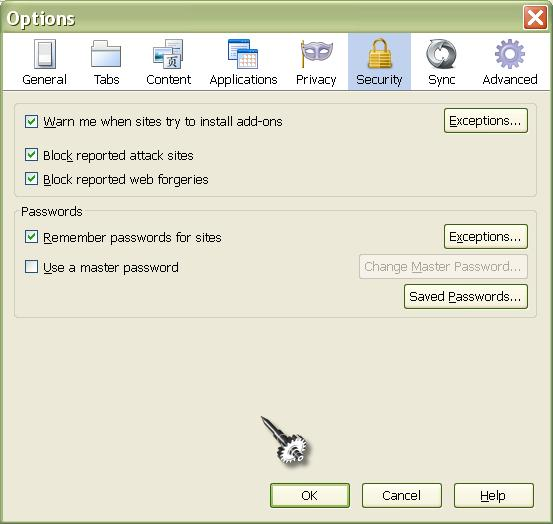
Thank You. (1) Exceptions is under "security" (2) I don`t run in "private browsing mode" (3) I don`t tick "cookies" when clearing recent history. (4) Not sure about "Site preferences" I must reiterate that it`s only one website that doesn`t remember usernames and passwords. Cheers
選ばれた解決策
Hello again, i did a Google and found "How to Activate Auto Complete in Firefox 4" Even though i`m on Firefox 6 this at present has worked. The fix is in that article. Now, when i click on the login bar on that website, the email address is always there and the dots for the password popup. So, it has been remembered. Maybe someone else this will help