


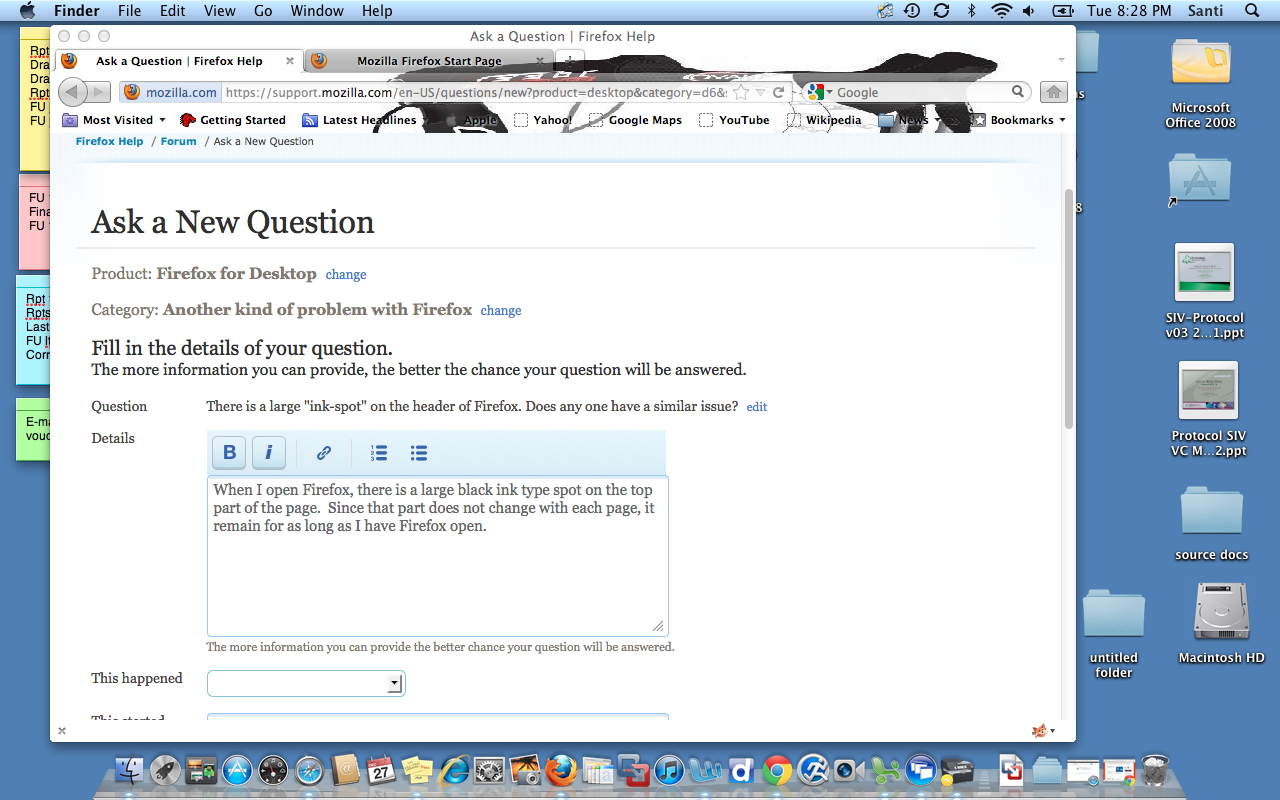
There is a large "ink-spot" on menu bar.

There is a large black-ink spot covering part of the menu bar. How can I get rid of it? I uninstalled Firefox and installed it again and the spot is still there.
選ばれた解決策
It appears you've installed a persona without knowing it. To turn it off, go to Tools > Add-ons > Appearance. Select Default, and click Enable.
For more info about themes, see Use themes to change the look of Firefox.
すべての返信 (4)

I think in a case like this, it would be very useful to actually see what you're talking about. If you can create a screenshot and attach it to this thread, that you help everyone know what you're referring to as an ink-spot. For instructions on how to create a screenshot on Mac, see http://www.youtube.com/watch?v=h3RkDPfphSQ
Right now, my guess is that the spot is caused by an add-on. If you close Firefox, then start Firefox in Safe Mode, does the problem still occur? To start in Safe Mode, go to Help > Restart with Add-ons Disabled.
If the problem does not occur in Safe Mode, then you can disable your extensions one-by-one until you find out which one is causing the problem. See Troubleshoot extensions, themes and hardware acceleration issues to solve common Firefox problems.
Thanks for your quick response. I followed your directions, and unfortunately the problems still occurs when I open Firefox on Safe Mode. I have attached a screenshot so you can see the black spot on the menu bar. If you have further recommendations, I would really appreciate them.
選ばれた解決策
It appears you've installed a persona without knowing it. To turn it off, go to Tools > Add-ons > Appearance. Select Default, and click Enable.
For more info about themes, see Use themes to change the look of Firefox.
Thanks for your help. The black spot is gone now.