


The 'Contacts' tab is redundant as it does not show any contacts when activated

It's very simple as I said with my question; there is no data appearing on the contacts tab when using FF5. This does not happen with other browsers and other machines.
すべての返信 (5)
Where are you seeing a "Contacts" tab?
Firefox doesn't do email or save "Contacts".
Is that part of a web mail interface?
Hi there,
I don't know what version of FF you're using. I am using 5.0 and it very clearly has 4 tabs - "What's New; Inbox/etc; Contacts;Updates - and when I press on the "Contacts" tab I get a spinning timer and no contacts, but I don't have this problem with IE. Check out this file I was sending to Yahoo who couldn't help me and didn't know what was going on.
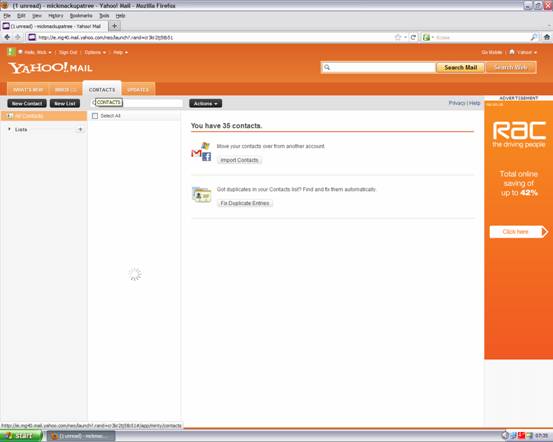
That is not "in Firefox", that is part of the Yahoo!Mail web page you are viewing. As to why your 35 contacts aren't appearing there, I have no idea and I can't check it out myself as I don't use Yahoo!Mail. I can only guess there is some sort in compatibility with Yahoo!Mail and Firefox 5.0.
Have you tried clearing your cache and cookies?
Yeah, sorry. I realised after I posted that of course this is the mail client and nothing to do with the browser. doh! I have tried those things and nothing seems to work. I guess I'll just have to go back to Yahoo and keep trying. Thanks for your help.
You're welcome.
Please click the Solved It button next to the answer that solved your Firefox support issue, it appears when you are logged in, so this thread gets marked as Solved to help other users who may have this same problem.