


"Add New Tab" button does not exist in the Window -Customize Toolbar, and not on my Navigator toolbar. Where can I find one to put on my Navigator toolbar, please?

I see "Add New Window" but..."Add New Tab" button does not exist in the Window -Customize Toolbar any longer, and not on my Navigator toolbar. Where can I find one to put on my Navigator toolbar, please? Thanks
I see "Add New Window" but..."Add New Tab" button does not exist in the Window -Customize Toolbar any longer, and not on my Navigator toolbar. Where can I find one to put on my Navigator toolbar, please?
Thanks
すべての返信 (2)
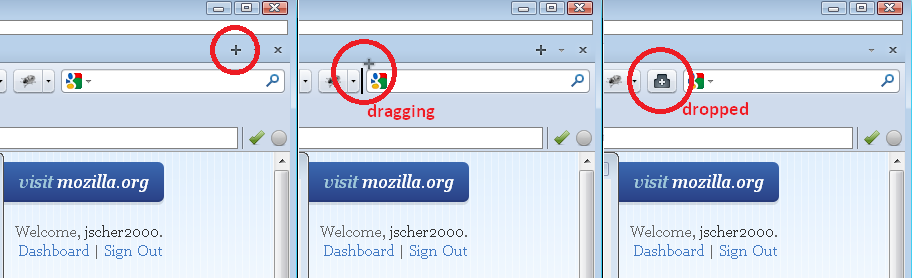
It's the "+" on the Tab bar. You can move it to the Navigation Toolbar if you prefer. When you start Customize, the + moves to the far right end of the Tab bar. You can drag it where you want (see attached image).
Any luck?
Thank You