


Open
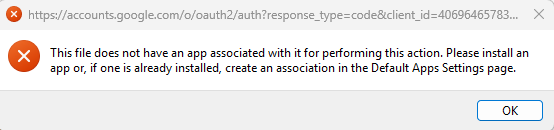
Expected popup for Gmail login is missing. "The file does not have an associated app"

I had to reinstall Thunderbird after doing a clean install of Windows 11.
Since installing, the expected login popup for Gmail doesn't appear. I get the attached error message instead.
Yahoo worked fine after a few tries. What is the problem here, and how can I fix it?
I had to reinstall Thunderbird after doing a clean install of Windows 11.
Since installing, the expected login popup for Gmail doesn't appear. I get the attached error message instead.
Yahoo worked fine after a few tries. What is the problem here, and how can I fix it?
この投稿は Wayne Mery により に変更されました
すべての返信 (1)
I tried just now to set up Gmail manually in Thunderbird. It gave me a message that it updated the information automatically. I get the same error I posted yesterday.
Please help. I need to move my Gmail messages into Yahoo. I have Thunderbird for only that reason.