


Firefox version 153.0.1 causing hangup when "Clear Recent History" is selected.

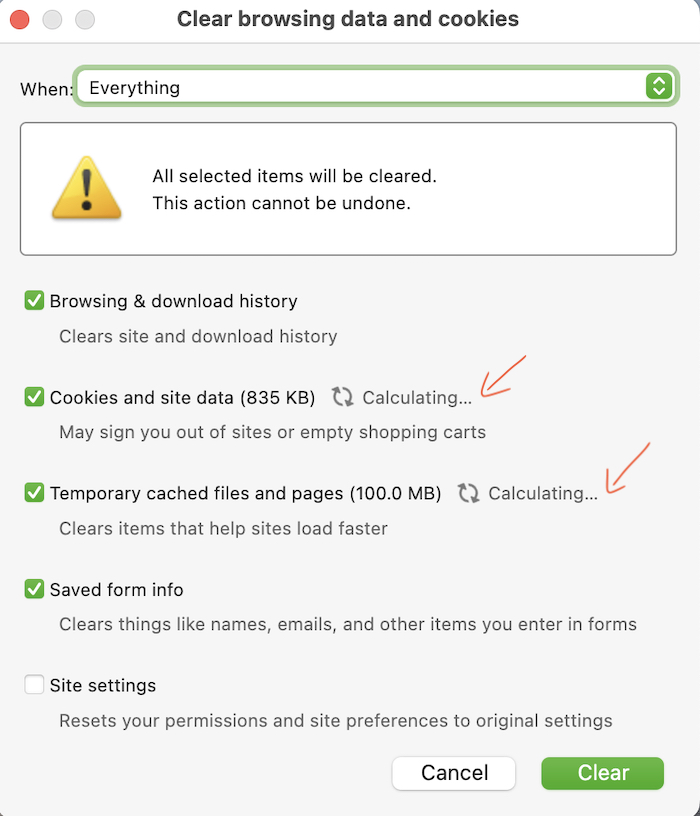
Immediately after I downloaded the latest update 153.0.1 for Firefox on the Mac, I noticed an issue with the Clear Recent History request. Whenever I select Clear Recent History (under History in the top bar menu), the popup box that opens always shows it is "calculating" the data, even if I only visited one website and closed it (or left it open). If the Clear button is active, I will click it and the box closes, but I never know if the history was cleared.
However, many times, the Clear button is grayed out while the "calculating" is in progress, and it freezes up the popup box. I cannot close it or click on any other part of the screen. It appears to freeze (crash) Firefox. My only option then is to quit Firefox and reopen it. When I do, the popup box is gone. But I still have no confirmation that the history has been deleted. But after visiting one or more websites that I want cleared of history (news sites, etc) the issue reappears again as soon as I select Clear Recent History.
I have a whitelist of many sites that I allow to store cookies and site data. But for all other sites, I routinely clear my history when I am done viewing them. This issue has never happened before, so I'm wondering if it is a bug in the latest 153.0.1 update. Before I downloaded the latest Firefox update, I checked to make sure it was compatible with my current version of Ventura 13.7.8 on a MBP 2022. And the clear history issue never appeared when I was on Firefox 152.0.6.
Attached is a screenshot of what the Clear Recent History popup looks like when "calculating"...
すべての返信 (6)
I think this "legacy" dialog is only used when other dialogs are open (i.e. library, bookmarks, history), and I've noticed on my macOS 15 the spinners also spin infinitely, even though the sizes are already calculated.— however it should not be used for some time unless these other windows are open, and instead should open the "internal" panel, the same one like you get when clearing data from within the settings.
There however are hangs reported when clearing history, in a different place than you see here, but it might be related. This is a good hint to actually check both dialogs and their states. (I'll try to see if I can bisect to any of those changes in behavior.)
Would you be willing to help capture some logs for when this happens? (It might involve running commands from Terminal, if you're comfortable with that.)
@jbr...Thank you for sharing some insights into this issue! First, when you mentioned "legacy" dialog (I assume you're referring to "dialog boxes"?), I just wanted to clarify, I didn't purposely bring back the old style to use, in case you thought it was causing the issue (see attached image). It hangs whether I use the drop down menu in the top bar, or access History (image attached) via the 3-bar menu to clear history. I also have Firefox set to automatically clear all history on closing. The glitch I'm currently experiencing happens when I wish to clear history between sites, but am not ready to close down. I have not used the "Forget" option.
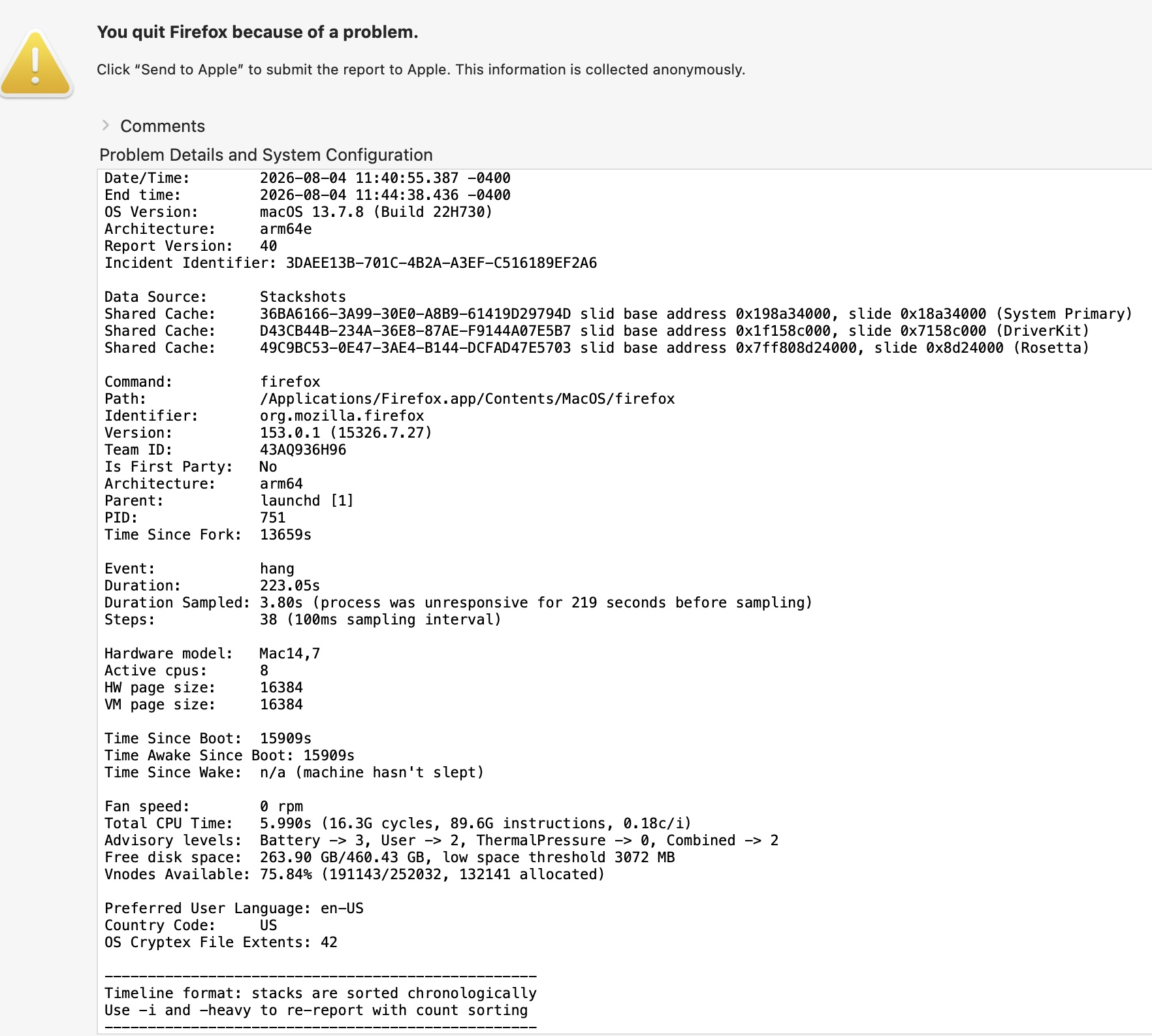
I also wanted to clarify that when the Clear Recent History dialog box hangs, it freezes up Firefox, along with my cursor, so my only option is to force quit Firefox. It doesn't close or quit unexpectedly, which would generate a crash report by Mozilla. So the only report I can generate is from Apple when I force quit the app. I've included a screenshot of the top part of one of those crash reports in case it would be of any help to troubleshoot the issue. If you need to see the full report (which repeats other info over and over for different parameters) I can copy and paste it.
If I can grab any generated crash reports, I will be happy to provide them. But I'm not comfortable using Terminal to troubleshoot issues. I've only used it a few times for simple procedures. Plus, there is the privacy factor involved when supplying reports to someone else. So I will do what I can without it. But, have my fingers crossed that the next Firefox update will clear the issue!
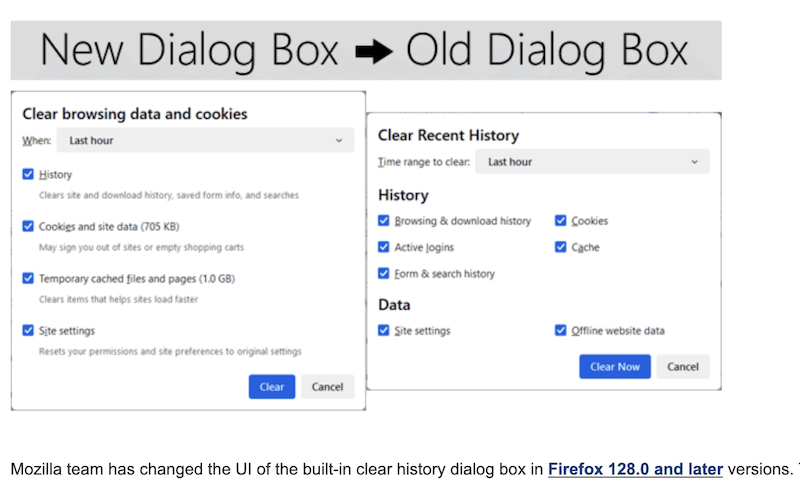
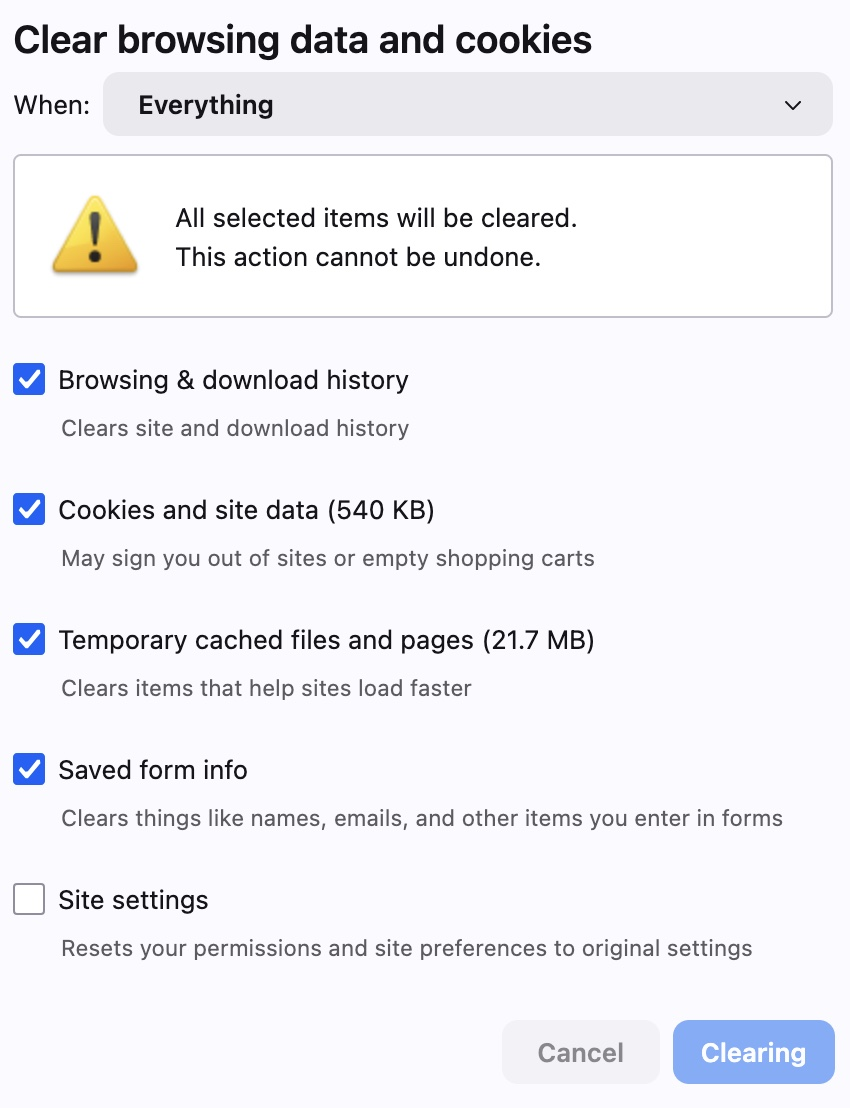
See the green–outlined macOS system dropdowns and buttons in your original post? That's the legacy panel, it only opens when there are other macOS dialogs open beforehand. The expected pane normally is the Firefox–internal one, the one shown in your subsequent reply, with flat dropdowns and blue buttons. (I went several versions back in the meantime and the infinite spinning on the legacy one is not related, that has been around for a while, just in the legacy pane, even though the sizes are correctly measured already — so while obnoxious, it's not connected to this new issue.)
And you're right — these crashes are not actual crashes, but hangs, that got terminated by the system. So the built–in crash reporter is not aware. That's why nobody was able produce any helpful logs, and more intentional steps need to be taken.
Instead of profiling/logging (the terminal bit is because of the hang, so profiling "hanging" app is a whole another beast…) — would you perhaps be able to run mozregression that would pull multiple builds in a contained environment for you, and you'd just push "good" vs "bad" buttons to help narrow down to the day, and then the changeset, that made the app hang on your system? If the video there looks like something you'd be able to help with, I can write up some instructions for you. Thanks!

Thank you for sharing some insights into this issue!
Before I address your mozregression request, I just want to clarify something regarding the "green" vs "blue" buttons and outlines in the clear history box: The green one always pops up when I use the top menu bar to access clear history, and the blue one pops up when I access the history from the 3-line menu. but BOTH hang either while calculating or right after I click the "clear" button. But, confusingly, it doesn't freeze up every time with either one, so I don't know what is triggering it. But both images I uploaded were during a hang/freeze stage, so I had to force quit.
The mozregression tool is very interesting. I watched the video and downloaded the dmg file for the Mac just to make sure it installed ok. I would definitely need some guidance on what "bisections" and "builds" and whatever to set up. I wouldn't have any idea where to begin! But I would be willing to give it a try as long it didn’t mess up my laptop.
I didn't quite understand how each new Firefox build was appearing on his screen... was he reopening a Firefox icon himself each time, or was the mozregression tool doing that automatically? And I assume these were totally separate from the currently used Firefox app on his computer? Also, was he clicking "good" to mean that the new build was showing what should be correct? Or does "good" mean the current build is showing the problem? That was a little confusing in his video. But my biggest concern is, how do I replicate the issue during the running of the mozregression? I can see how a color change or toolbar icon would be immediately noticeable. But how will I see if a dialog box is working if it is not visible and in progress, especially when it doesn't do it every time?
Unfortunately, my biggest issue right now is time... I am in a time crunch right now. So if you want to send me instructions, I can give it a try, but not sure how soon I can do it. I understand, too, I might have to download the installer again if there is a newer version. Just let me know.
I'll make a shortcut/assumption. In case this would also exhibit with a clean separate profile using nightly builds (yes, these come with isolated profiles of their own), these are currently being investigated:
During v153 cycle, the "first bad" seems to point at:
- https://ftp.mozilla.org/pub/firefox/nightly/2026/05/2026-05-30-09-20-40-mozilla-central/ (for your Mac look for ".dmg" installer in the list)
to see if it exhibits the same hang — and conversely, if you can confirm, then test this earlier build deemed "last good":
to see if the problem doesn't exist in that one? Thanks!