


Windows 10 reached EOS (end of support) on October 14, 2025. If you are on Windows 10, see this article.

Mozilla サポートの検索

サポート詐欺に注意してください。 私たちはあなたに通話やショートメッセージの送信、個人情報の共有を求めることはありません。疑わしい行為を見つけたら「迷惑行為を報告」からご報告ください。

詳しく学ぶ
Open

Can't find outgoing server after login following Win 11 sleeps

Irwin D

Thunderbird functions normally (sends/receives), except after Windows 11 goes to sleep, I log back in without difficulty., but attempting to use Thunderbird to send email fails with the message

"Sending of the message failed. The message could not be sent because connecting to Outgoing server (SMTP) smtp.mail.me.com failed. The server may be unavailable or is refusing SMTP connections. "

There's no prompt to re-enter the primary password, and the only way to restore normal Thunderbird operation is by rebooting WIN 11. Is this a known bug with a workaround? The failure occurs whether the outgoing server is smtp.mail.me.com (Apple), smtp.comcast.net, or smtp.gmail.com
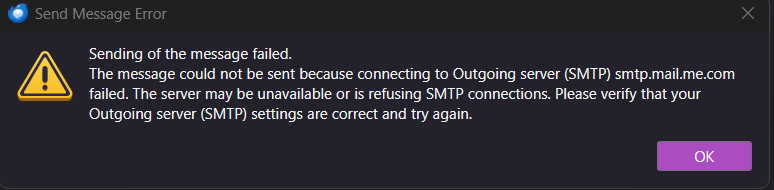
Thunderbird functions normally (sends/receives), except after Windows 11 goes to sleep, I log back in without difficulty., but attempting to use Thunderbird to send email fails with the message "Sending of the message failed. The message could not be sent because connecting to Outgoing server (SMTP) smtp.mail.me.com failed. The server may be unavailable or is refusing SMTP connections. " There's no prompt to re-enter the primary password, and the only way to restore normal Thunderbird operation is by rebooting WIN 11. Is this a known bug with a workaround? The failure occurs whether the outgoing server is smtp.mail.me.com (Apple), smtp.comcast.net, or smtp.gmail.com
添付されたスクリーンショット

すべての返信 (1)

THis may be a Windows issue, where some components do not awaken. Thunderbird just rides on that horse and is dependent that it works.

質問する

投稿に返信するには あなたのアカウントにログイン する必要があります。まだアカウントをお持ちでなければ、新しい質問を開始 してください。