


Thunderbird Android App Connections

I uploaded the Thunderbird Android App to my Galaxy S24 Mobile Phone and can't get it to show the various Folders (Inbox, etc), nor does it upload my Email Addresses.

選ばれた解決策
Hi connman
Can you tap "manage folders" at the bottom of the account side bar and check if Inbox is listed.
Try refreshing the folder list if missing. (Manage folders > three dot menu > refresh folder list)
Check the Inbox folder is not just hidden. Tap manage folders > Inbox: Toggle "Show folder" ON.
It's possible something corrupted when the account was first setting up. Try removing and adding the account again and see if the issue resolves. Tap settings > account name > three dot menu > remove account.
すべての返信 (4)
Can you look at the below ticket and confirm your viewing a specific account and not the Unified Inbox. https://support.mozilla.org/en-US/questions/1591072
Folders are displayed in the side bar when an account is selected, rather than the Unified Inbox.
Your statement: "nor does it upload my Email Addresses." is unclear. Can you please clarify what you mean or are trying to acheive.
Hi Platform34,
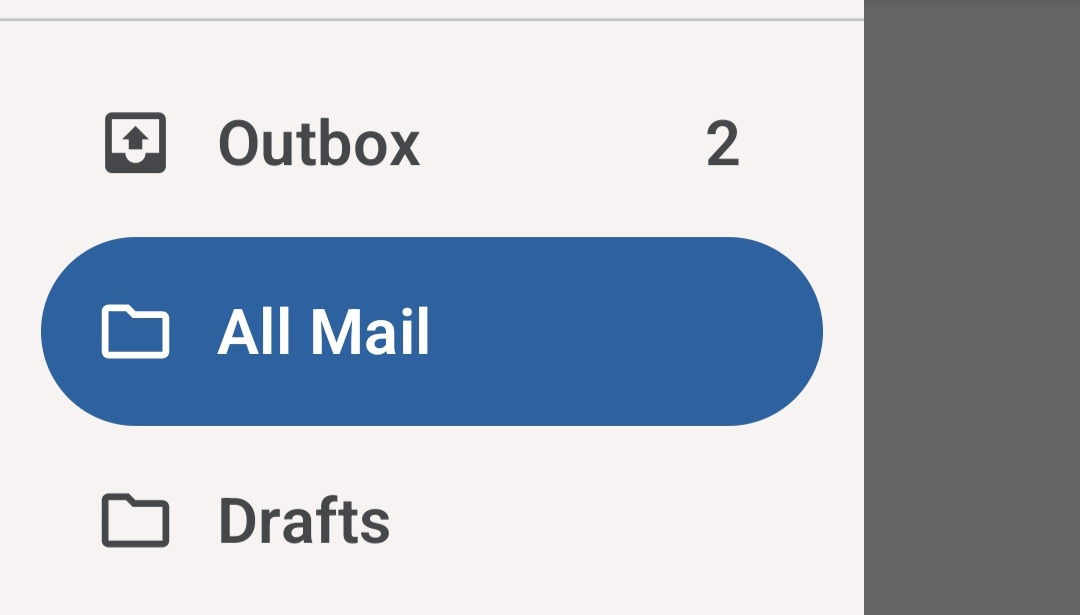
1) Viewing: I looked at the ticket, and "yes", I'm viewing specific accounts. 2) Connection: In playing around with them more, I found out I wasn't "connected". So, I connected my first Thunderbird email account/personal Gmail Account. 3) Results: I'm still not getting an "Inbox" to view my Emails. Please see the image attached for what I see.
Hopefully, all this helps?
Thank you.
選ばれた解決策
Hi connman
Can you tap "manage folders" at the bottom of the account side bar and check if Inbox is listed.
Try refreshing the folder list if missing. (Manage folders > three dot menu > refresh folder list)
Check the Inbox folder is not just hidden. Tap manage folders > Inbox: Toggle "Show folder" ON.
It's possible something corrupted when the account was first setting up. Try removing and adding the account again and see if the issue resolves. Tap settings > account name > three dot menu > remove account.
Hi Platform34,
I may have been too quick to respond. I went back into my personal email, and all is functioning correctly. I'm working on the others now.
Thank you!!!