


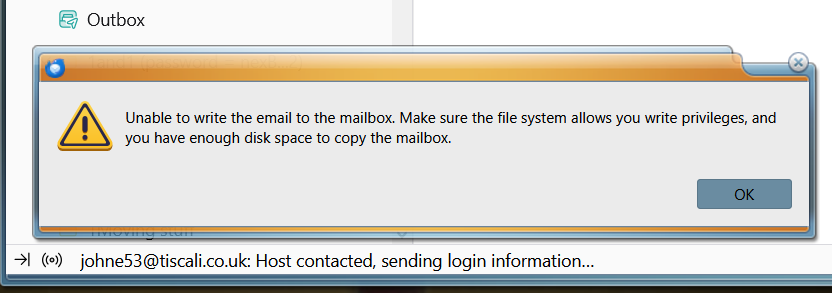
Unable to write the email to the mailbox

I've been using Thunderbird on Windows 10 since last year sometime. Currently I'm on version 151.0.1.
I've 4 x mailboxes here and since yesterday, 3 of them show me an unusual message when checking for emails. I tried attaching a screenshot but although the screenshot uploaded, I couldn't find a way to insert it here. But the message says Unable to write the email to the mailbox and asks me to check if I've write privileges (which I have) and to cheek the available disk space.(currently 101GB free).
The message is happening 2 or 3 times each day and lasts for about half an hour, then everything works fine again. Has anyone else seen this??
すべての返信 (9)
I've just realised something important. If I click Inbox for whichever account is showing that message I see a different message:-

I found another question here from someone who'd had a similar problem and the reply was to rebuild the global database so I've started the process here but I'm wondering if anyone can confirm if that's the right approach for a problem like mine?
The inability to write to the mail file, which is essentially what that error is about, usually means some other process is using the file at the time it is to be written.
So the first thing to check is the Anti-Virus. What Anti-Virus are you using? Exit Thunderbird Access the Anti-virus and make your Thunderbird profile folder exempt from scanning.
If you downloaded Thunderbird from the official website: https://www.thunderbird.net/en-US/thunderbird/all/
Then, it's likely your Thunderbird folder to exempt will be here: C://Users/username/Appdata/Roaming/Thunderbird
If you exempt that folder then it will also exempt anything it contains.
Restart Thunderbird and report on results.
Thanks Todd, It's very early days but up to now, rebuilding the global database seems to have fixed it. I'll keep the Anti-Virus possibility in mind though, in case the problem returns. I'm just using the standard Windows Virus & Threat protection here (not sure what it's called these days but it used to be called Defender).
I tried exempting my Thunderbird profile folder (in Windows Defender) and I'd previously tried rebuilding my global database but neither of them helps.
A few posts ago I showed a message I see saying No message found. Does nobody else see this? I see it regularly when clicking in Thunderbird's LH pane.(e.g. clicking the Inbox for a particular email account). If I remain with the Inbox selected, the message takes an age to go away. It only goes away quickly if I click something else and then return to the Inbox.
I'd previously been using a much earlier version of Thunderbird and never saw the message once, but since upgrading to version 151 I see it at least 5 times every day.
この投稿は johne53 により に変更されました

johne53 said
A few posts ago I showed a message I see saying No message found. Does nobody else see this? I see it regularly when clicking in Thunderbird's LH pane.(e.g. clicking the Inbox for a particular email account). If I remain with the Inbox selected, the message takes an age to go away. It only goes away quickly if I click something else and then return to the Inbox.
Try R. click that Inbox > Properties > click 'Repair folder' button, then R. click that Inbox > Compact.
That was a great tip Ed. I repaired the relevant folders last week and No message found hasn't reappeared for any of them!
One more question if you don't mind... I've a couple of old email accounts in Thunderbird which are paid accounts so I'll soon be closing them. I realise that I can enter the Settings page for each account and delete them but rather than deleting them, is there a way I can keep them locally but disable them? (e.g. for searching through old emails)
Thanks for all your help.
johne53 said
One more question if you don't mind... I've a couple of old email accounts in Thunderbird which are paid accounts so I'll soon be closing them. I realise that I can enter the Settings page for each account and delete them but rather than deleting them, is there a way I can keep them locally but disable them? (e.g. for searching through old emails)
Copy all messages from both accounts to subfolders of Local Folders. Automated disabling of accounts is in the works; doing it manually has issues. So once you've moved the messages, just delete the accounts.
Thanks again Ed.
Just a thought... depending on how long the new Automated feature takes, would this be useful as an interim solution..?
When right-clicking the top LH button called Get All New Messages Thunderbird currently lists all the email addresses it's going to check. Maybe (if the Settings for each account contained a Disable button) Thunderbird could remove that account from the above list and also under Server Settings->Server Settings it could disable all the options there (e.g. for automatically downloading new messages etc) ?