


Thunderbird completely changes format with each update and loses my receipts

Every time I let Thunderbird update, the format changes to a previous format and my emails and folders are gone.
Having to call my contacts to have them send these receipts again is frustrating. Setting up new folders AGAIN is frustrating.
I have thought of contributing to you, but this behavior is beyond infuriating and costs me hours and hours of time to fix.
How can I get consistency? How can I retrieve what is lost? The only thing I know to do is to STOP letting you update my program.
Not a happy camper.
すべての返信 (4)
My first suggestion, at least until you resolve the issue, is to set thunderbird to not update automatically. Second, I would check to see if you have older profiles. You can check that by these steps: - click help>troubleshootinginformation - scroll down to 'profiles' and click 'about:profiles' - this next screen will list all profiles. if thunderbird created a new profile on the update, you might find your missing content there. Within the profiles, look to the imapmail folder for any possible IMAP accounts, the mail folder for any POP accounts, and the mail\Local Folders folder for any local folders. I am curious why you are not losing your addressbook as well. Anyway, my suggestions may not work, but I am troubled in considering that all folders are gone. Let us know.
Not all the folders are gone. Every time there is an update to Thunderbird on my PC it reverts to a previous format...no more dot to click to say something is read. No new folders from previous version with management tool used.
The next time it updates, it goes to the one before and so on and so on. I am having major work done and like the folder management to get instant information from the workers. This then disappears in the next Thunderbird update. All those moved emails gone and the receipts for jobs completed. I then scramble to try and create the folders again, but the emails are gone. I have to contact the workers and have them send them to me again...showing my incompetence.
There is no option in Thunderbird to not update. I have to change the name of a file in order to stop updates. Seems like a crazy thing to have to do.
I have been using Thunderbird for many decades and am now totally disillusioned.
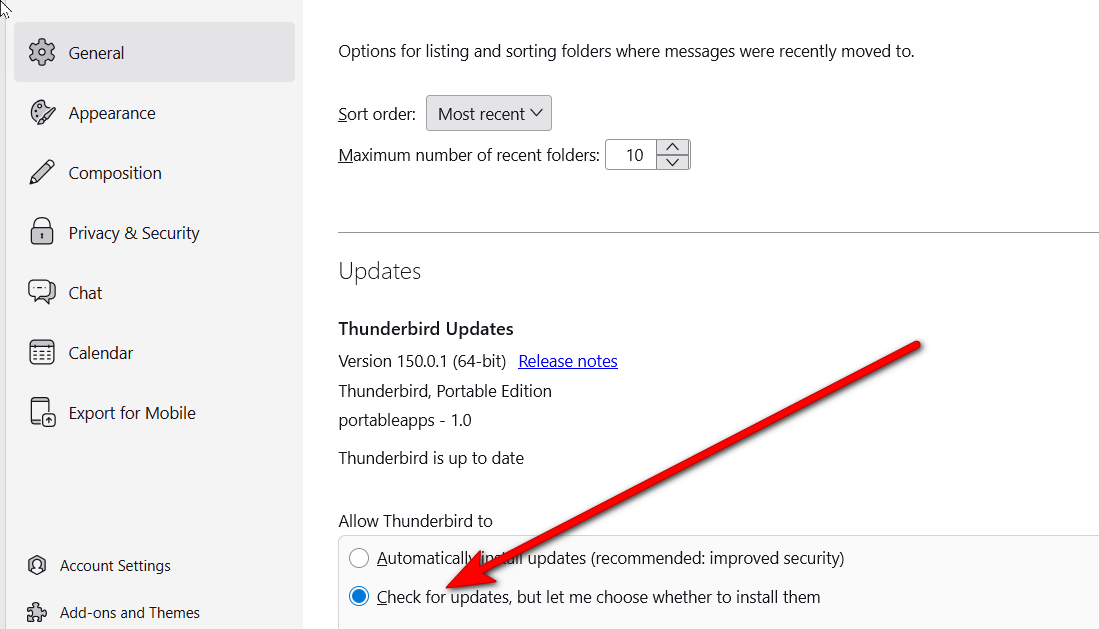
First, you can turn off autoupdate at settings>general. see screenshot below. Second, I am not understanding what is happening. For example, you state ' it goes to the one before and so on and so on. ' and i don't know what you mean by that. Providing more detail, or maybe screenshots and detail, will be helpful. Also, I don't know what you mean by going to previous format. Details will help. Thank you.
I am using a PC not a phone.
The structure is the layout (which is on the right). When it is in one layout, the folders I saved with tools/manage filters are different than the folders that are there for the second layout. Each time that thunderbird updates, the new update will go to the other layout than the one I was currently using. I will then try to get the folders with tools/management into this layout....but Thunderbird updates again. The messages that have been added to the folders in one layout will NOT appear in the folders of the other layout and any new folders I have created in the current layout, will not appear in the the second layout after an update.
Since you are unaware that this is occurring, it sounds like there is no help for me if I continue to use Thunderbird. I will have to look at other alternatives instead of what I have been using for decades.