


High GPU usage on Google Search AI Overviews - Firefox 149.0.2 (macOS) - Chrome is fine

Hello,
I am reporting a performance issue specifically related to Google Search's AI features (AI Overviews) in Firefox 149.0.2 on macOS.
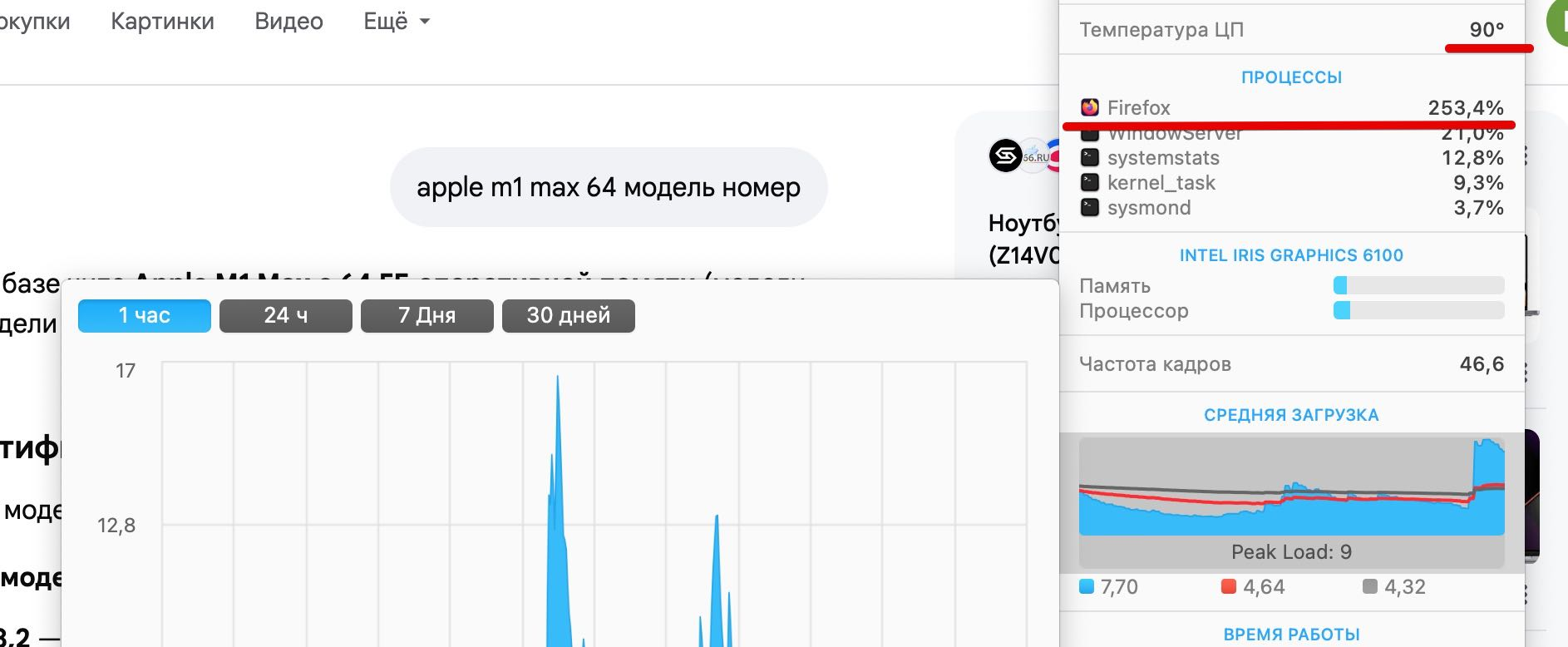
The Issue: When an AI-generated summary appears in Google Search results, GPU usage spikes significantly, reaching up to 212%. This causes the laptop to overheat and triggers high fan speeds.
Critical Comparison:
Firefox 149.0.2: Extreme GPU load and performance degradation when rendering Google AI elements.
Google Chrome 147.0.7727.56: Works perfectly with normal GPU usage under the same conditions.
Tested on two different MacBooks: MacBook Pro (A1502), 16GB RAM, i7 (2015) — OS: macOS Monterey. MacBook Pro (MMQX3), 64GB RAM, M1 Max (2021) — OS: macOS Sequoia (15.x/Tahoe).

すべての返信 (2)
Hello
Apparently, a similar subject https://bugzilla.mozilla.org/show_bug.cgi?id=2032772
For information, you can test, add custom search engines in Firefox https://support.mozilla.org/en-US/kb/add-custom-search-engine-firefox
4. In the URL with %s in place of the search term field, copy & paste the URL of the custom search engine.
https://www.google.com/search?udm=14&q=%s