


How to Select a Firefox Perofile

I had a problem where FF 140.0 would not update, and in trying to get FF yo update, I used a re-install tool to which I was pointed in my problem report. This caused FF to wipe out my configuration, and I lost all my windows and tabs. I have gone to
\Appdata\Roaming\Mozilla\Firefox\Proifiles\abnfpged.default
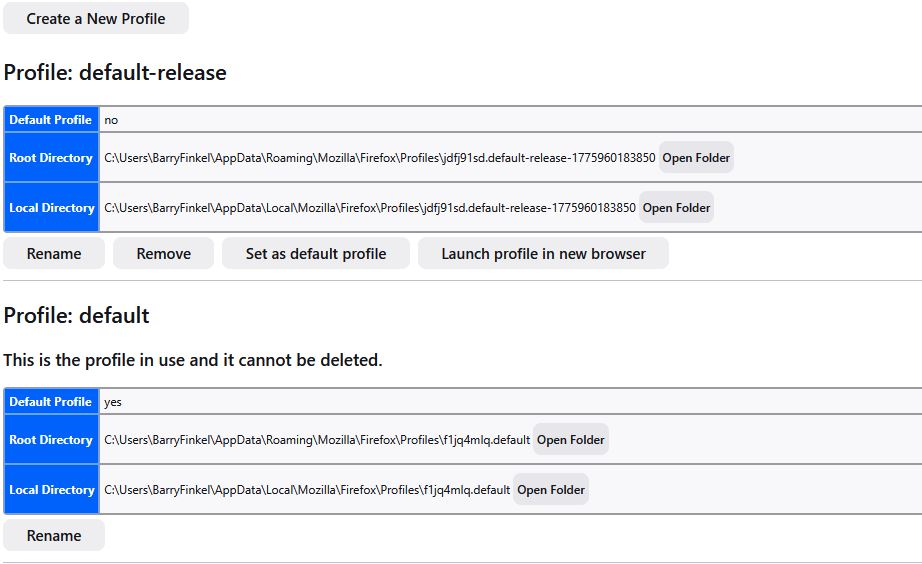
cleared all of the data therein, and restored that directory from a backup I made last Monday. But I cannot get FF to use that directory. "about:profiles" shows only two profiles, but the Profiles directory has five profiles:
03/10/2026 09:39 AM <DIR> qf00ka5x.default 03/10/2026 09:39 AM <DIR> v842ceue.default-release 04/11/2026 09:16 PM <DIR> .. 04/11/2026 09:16 PM <DIR> . 04/12/2026 03:08 PM <DIR> abnfpged.default 04/12/2026 06:29 PM <DIR> jdfj91sd.default-release-1775960183850 04/12/2026 06:48 PM <DIR> f1jq4mlq.default
Only the profiles beginning with "j" and "f1" are seen in the "about:profiles" screenshot I have attached. And I have attached a screenshot of my profiles.ini file. Also, in the abnfpged.default directory I restored, where is the list of all of my open windows and tabs? FF used to keep that in a sessionstore.jsonlz4 file, but that file is only written when FF closes. I tried to save a copy when I was having problems, but I stored the copy in the same directory, which FF changed during the re-install process. Here is my profiles,.ini file:
[Install308046B0AF4A39CB] Default=Profiles/jdfj91sd.default-release-1775960183850 Locked=1
[Profile1] Name=default IsRelative=1 Path=Profiles/f1jq4mlq.default
[Profile0] Name=default-release IsRelative=1 Path=Profiles/jdfj91sd.default-release-1775960183850
[Install641D10338ABA448D] Default=Profiles/abnfpged.default Default=1 IsRelative=1 Locked=1
[General]
- StartWithLastProfile=1
Version=2
[BackgroundTasksProfiles] MozillaBackgroundTask-308046B0AF4A39CB-defaultagent=lnvi5jn5.MozillaBackgroundTask-308046B0AF4A39CB-defaultagent
I have not worked with the ;profiles.ini file in many years, as my FF configuration has not had problems. Thanks.
すべての返信 (4)
One typo correction in what I wrote yesterday - I was running 149.0 (not 140.0). Now I am running 149.0.2 [in a different profile than the one I lost over the weekend]. I really want to get my old profile back. Thanks.

A profile may be missing from the about:profiles page because Firefox has lost track of it, even though the profile folder still exists. You can create a new profile using the [Choose Folder] option in the Create Profile Wizard to select that profile folder, to recover the data it contains. For details, see the Profile Manager - Create, remove or switch Firefox profiles article.
This is a continuation of /questions/1575745 Cannot Upgrade from Firefox 149.0 (That question is solved, since you did update from Firefox 149.0 to 149.0.2)
この投稿は AliceWyman により に変更されました
You will normally find these files in the sessionstore-backups folder:
- previous.jsonlz4 (cleanBackup: copy of sessionstore.jsonlz4 from previous session that was loaded successfully)
- recovery.jsonlz4 (latest version of sessionstore.jsonlz4 written during runtime)
- recovery.baklz4 (previous version of sessionstore.jsonlz4 written during runtime)
- upgrade.jsonlz4-<build_id> (backups created during a Firefox update)
You can try to restore the upgrade.jsonlz4 file from the last update or use a utility to browse Windows System Restore points to see if you can find a recent sessionstore.jsonlz4 file.
You can copy a file with Firefox closed from the sessionstore-backups folder to the main profile folder and rename the file to sessionstore.jsonlz4 to replace the current file.
- make sure to backup the current sessionstore.jsonlz4
You can look at this tool to inspect a compressed jsonlz4 sessionstore file. This tool works locally, no uploading is done.
I am getting VERY CONFUSED. I had a new profile (in use while I attempt to resurrect my old profile), and when I did an Exit and restarted FF, I got a session with ONE tab; the various tabs from my previous session were LOST. Why??? I thought that when I did an Exit and then restarted FF, my previous session would be used.
Exactly what do I enter while creating a new profile so that my restored profile abnfpged.default is used? And I prefer not to do something that will corrupt that restored profile. And what is the difference between "default" and "default profile"?
The "Create Profile Wizard" will create a new profile "default user" with a random set of characters as a name in my Profiles directory. I do not know what to specify in the name field, and I do not want to create a new profile in the Profiles directory that has the new random-character name.
My restored profile IS in the Profiles directory, and I have placed in in the Profiles.ini file. But I cannot get FF to give me the option to use that profile as my default profile. I have modified my Profiles.ini file; here is the current version:
--- [Install308046B0AF4A39CB] Default=Profiles/jdfj91sd.default-release-1775960183850 Locked=1
[Profile2] Name=default-release Path=Profiles/abnfpged.default Locked=1
[Profile1] IsRelative=1 Path=Profiles/f1jq4mlq.default
[Profile0] Name=default IsRelative=1 Path=Profiles/jdfj91sd.default-release-1775960183850
[Install641D10338ABA448D] Default=1 IsRelative=1 Locked=1
[General] Version=2
[BackgroundTasksProfiles] MozillaBackgroundTask-308046B0AF4A39CB-defaultagent=lnvi5jn5.MozillaBackgroundTask-308046B0AF4A39CB-defaultagent ---
I assume that it SHOULD be easy to modify this so that FF starts with by abnfpged profile, but I have not found the "trick". As I wrote above, it has been many years since I worked with my Profiles.ini file. I am a retired IT professional, so I should be able to modify the Profiles.ini file to do what I want.
Can someone tell me what I have to do to the Profiles.ini file? In the past few days, I have never seen FF list my abnfpged profile as an option. Thanks.