


Can't get Incoming G-mail (another email app can)

I just set up a gmail account in T-bird. I can send, but I can't receive. It keeps saying there's no email to get. I use a read-only email app called Mailwasher. I AM getting Gmail email in that app, while it's on the server.
I have gone through the settings in T-bird several times. I even checked on the web. - I entered what you see below (in both Thunderbird and Mailwasher): '"Incoming Mail Server Settings (IMAP) Hostname: imap.gmail.com Port: 993 Requires SSL: Yes Username: Your full Gmail address (e.g., example@gmail.com) Password: Your Gmail password"
I even tried changing the password a couple of times (also had to do this in Mailwasher).
UPDATE: now Thunderbird isn't logging on and wants a new password (which I've done twice already). No reason why.
PLEASE ADVISE. Kami
すべての返信 (3)
Yeah, mailwasher accesses the email using POP and the default action of Google is to only offer email once over POP.
Go here https://mail.google.com/mail/u/0/#settings/fwdandpop Correct your settings on Gmail for your use case.
So I changed the setting on google to POP. Is this correct?. I don't see anything else in the settings to change.
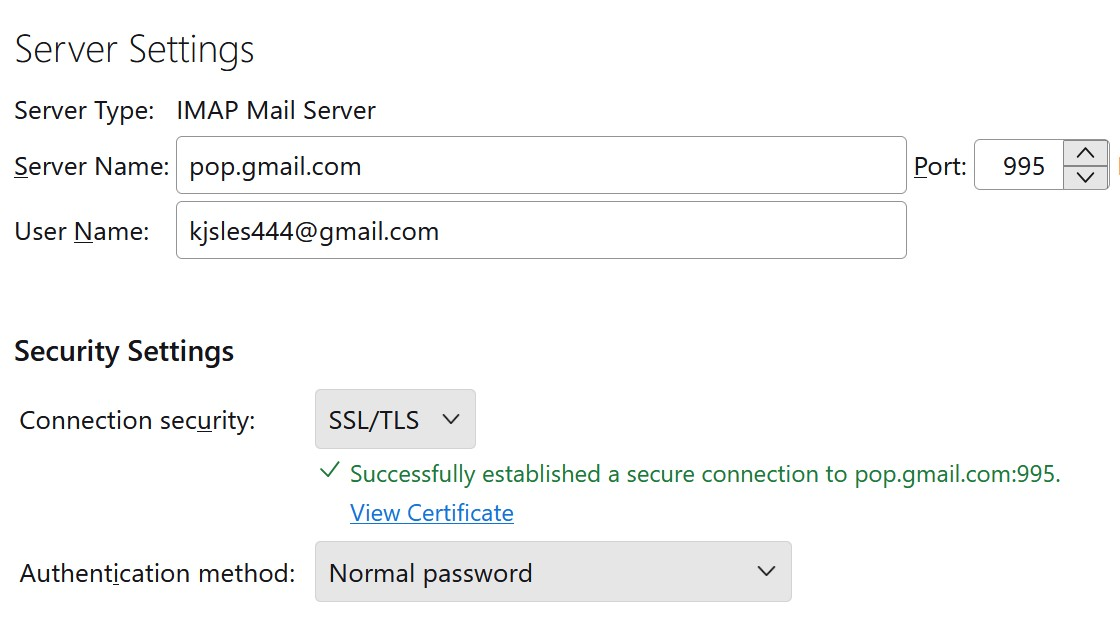
As you can see in the screenshot, TBird is connecting, but it still says there's no messages there - even though there are two which I sent as test messages from one of my Earthlink addresses. (I see them in Mailwasher.)
この投稿は Kami Scott により に変更されました
Did you do what I said ? No you did not. I said
Go here https://mail.google.com/mail/u/0/#settings/fwdandpop
You did something else entirely changing things in Thunderbird
Your issue has nothing at all to do with Thunderbird the issue lies in your setting on the google web site.
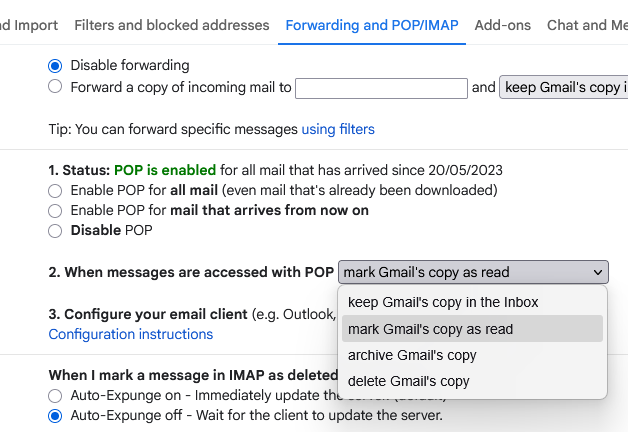 I would guess you need the "keep gmails copy in the inbox setting" but I really do not know for sure because I simply do not use mailwasher. This issue is something caused by the interaction of mailwasher with google. You need to fix that not Thunderbird even though your perception is Thunderbird is not working.
What you are doing here I have no idea by you need to change it back post hast. That setting simply will not work at all the account is configured in Thunderbird as IMAP and attempting to connect using IMAP will result in a connection failure. YEs it says it connects, but it will not work as soon as the conversation goes to actually trying to get mail instead of just connecting.
The correct server name for a GMail IMAP mail account is imap.gmail.com on port 993.
I DID go to that page and followed the instructions for setting POP and IMAP.
https://mail.google.com/mail/u/0/#settings/fwdandpop
I didn't notice anything about forwarding messages because I was concentrating on the imap to pop instructions. (It's late here, I'll get to it tomorrow.)
この投稿は Kami Scott により に変更されました