


Windows 10 reached EOS (end of support) on October 14, 2025. For more information, see this article.

Mozilla サポートの検索

サポート詐欺に注意してください。 私たちはあなたに通話やショートメッセージの送信、個人情報の共有を求めることはありません。疑わしい行為を見つけたら「迷惑行為を報告」からご報告ください。

詳しく学ぶ

PDF Editor issues in v146.0 64bit on windows 10 pro

  • 返信なし
  • 0 人がこの問題に困っています
  • 5 回表示
more options

I'm begining to regret installing v146.0!

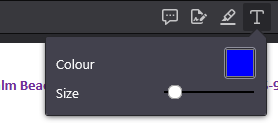
One of the most useful features of Firefox is the PDF editor and with this update, I've found that after annotating a PDF with several text boxes, clicking the text box icon (as shown in the attached screenshot) does absolutely nothing and it is impossible to enter any further text. The only way out of this is to refresh the pdf (after saving otherwise all changes will be lost) and then starting all over again only for the error to repeat itself making the editor almost unusable. Would really appreciate knowing how to work around this especially since to make my notes clearer, I change the color and the font size which is all lost everytime I have to refresh the PDF :-(

Incidentally, why are there so many updates? I prefer stable software that works rather than 'new features' that I never use!

Finally, Firefox used to have an amazing facility of making the Firefox private browser the default browser for Windows 10 but this was removed some years ago and can only be reinstated by changing registry keys. Everytime there's an update, these registry keys are overwritten :-(. Why was such a useful feature removed please?

Thanks in advance.
I'm begining to regret installing v146.0! One of the most useful features of Firefox is the PDF editor and with this update, I've found that after annotating a PDF with several text boxes, clicking the text box icon (as shown in the attached screenshot) does absolutely nothing and it is impossible to enter any further text. The only way out of this is to refresh the pdf (after saving otherwise all changes will be lost) and then starting all over again only for the error to repeat itself making the editor almost unusable. Would really appreciate knowing how to work around this especially since to make my notes clearer, I change the color and the font size which is all lost everytime I have to refresh the PDF :-( Incidentally, why are there so many updates? I prefer stable software that works rather than 'new features' that I never use! Finally, Firefox used to have an amazing facility of making the Firefox private browser the default browser for Windows 10 but this was removed some years ago and can only be reinstated by changing registry keys. Everytime there's an update, these registry keys are overwritten :-(. Why was such a useful feature removed please? Thanks in advance.
添付されたスクリーンショット

投稿に返信するには あなたのアカウントにログイン する必要があります。まだアカウントをお持ちでなければ、新しい質問を開始 してください。