


Windows 10 reached EOS (end of support) on October 14, 2025. For more information, see this article.

Mozilla サポートの検索

サポート詐欺に注意してください。 私たちはあなたに通話やショートメッセージの送信、個人情報の共有を求めることはありません。疑わしい行為を見つけたら「迷惑行為を報告」からご報告ください。

詳しく学ぶ

NEW Problem Saving PDF Downloads

  • 返信なし
  • 0 人がこの問題に困っています
  • 13 回表示
more options

In Settings I have "Save files to" set to Desktop. Under Applications, I have PDF Files set to "Save File." If I download any other type of file, it is saved to the Desktop, as instructed. However, when I open Firefox, the Save dialog shows PDF files will be saved to Downloads. If I change it to Desktop, the file will be saved to the Desktop. Other types of file, as mentioned above, show Desktop as the default in the Save dialog. Once I set Desktop for a PDF file, it will be remembered until I close and reopen Firefox. It will then switch back to the Downloads folder, but again, only for PDF files. Why? This is something that has stated happening sometime over the last couple of months.

Windows 10 Pro 22H2, October 2025 patches installed. Firefox v144.0.2
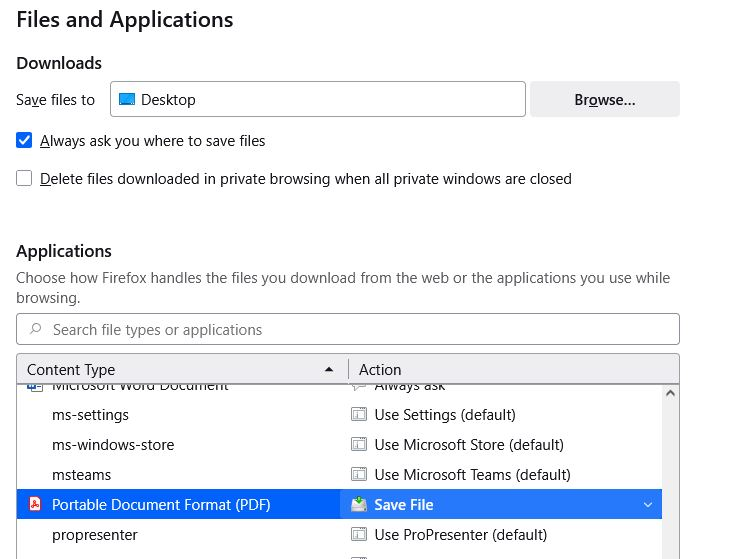
In Settings I have "Save files to" set to Desktop. Under Applications, I have PDF Files set to "Save File." If I download any other type of file, it is saved to the Desktop, as instructed. However, when I open Firefox, the Save dialog shows PDF files will be saved to Downloads. If I change it to Desktop, the file will be saved to the Desktop. Other types of file, as mentioned above, show Desktop as the default in the Save dialog. Once I set Desktop for a PDF file, it will be remembered until I close and reopen Firefox. It will then switch back to the Downloads folder, but again, only for PDF files. Why? This is something that has stated happening sometime over the last couple of months. Windows 10 Pro 22H2, October 2025 patches installed. Firefox v144.0.2
添付されたスクリーンショット

投稿に返信するには あなたのアカウントにログイン する必要があります。まだアカウントをお持ちでなければ、新しい質問を開始 してください。