


Why is my Firefox using so much battery after the latest update?

Hi, After updating to the latest version of Firefox on my laptop, I’ve noticed that the battery drains much faster than before. I haven’t changed any settings, but the browser seems to consume more power even with just a few tabs open.
I’ve already tried:
Restarting my laptop
Disabling unnecessary extensions
Clearing cache
But the issue is still there. Is there any specific setting or workaround to reduce battery usage in the new update?
Thanks in advance!
すべての返信 (6)
It may be temporary due to some AI features.

Like for example (but not exclusively) https://bugzilla.mozilla.org/show_bug.cgi?id=1982278

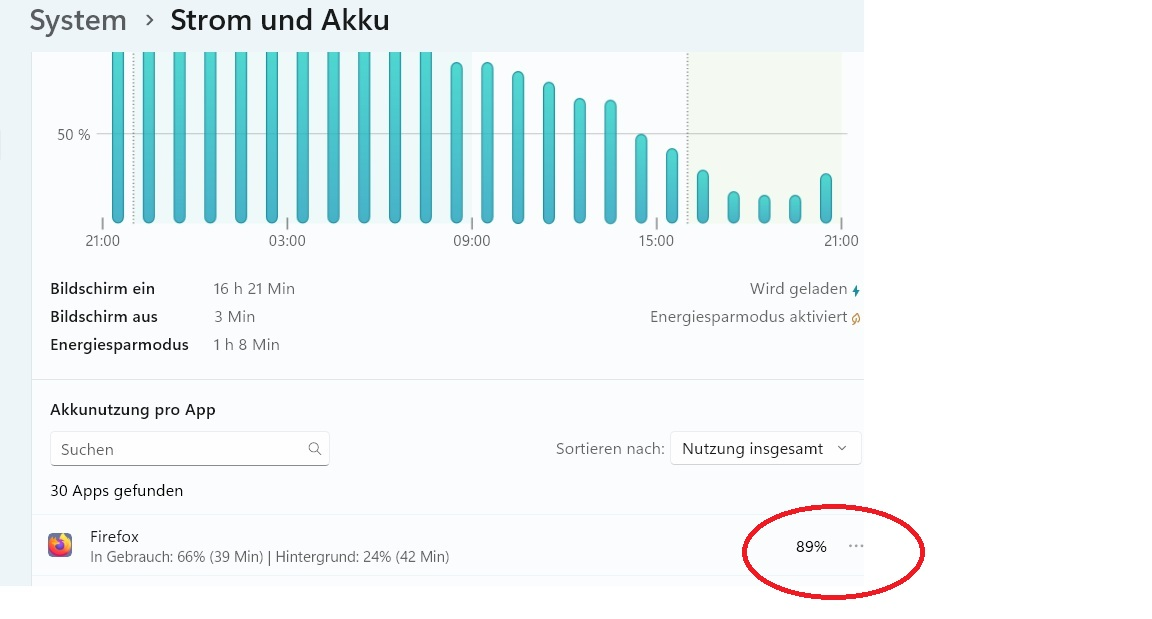
I´m having troubles on excessive battery drain and the ACER Aspire3 charger cannot keep up with the demand. I notice in the system console the statistic of 89% is used by Firefox. I have disabled the AI part and any unnecessary programs and running with the barest minimum.......so what and where is the power hog going ? rj
Please create a new question, your issue is different.
Plus this thread was archived locked due to age.
https://support.mozilla.org/en-US/questions/new/firefox/form