


What happened to folders under the unified inbox?

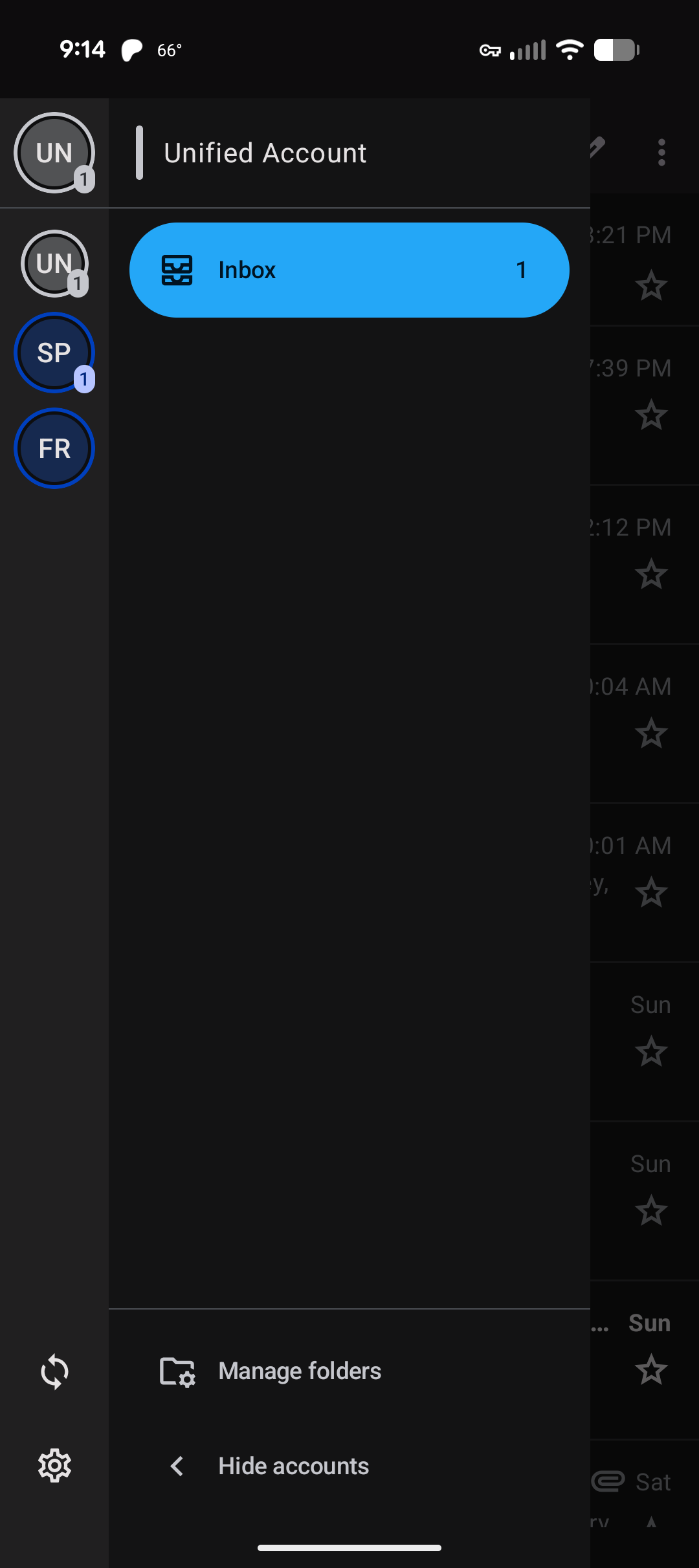
Thunderbird on my Android phone updates to 12.1 today, and now the unified inbox no longer has folders under it. In the attaches screenshot, there used to be folders below "Inbox". I could control which folders from any account showed up there. Now they're all gone. How do I bring them back?
すべての返信 (6)
Version 13 should be available later this week. Please post your status after you are able to update.

Hi spartanhooah
The folders previously displayed below Unified inbox were those associated with the selected email account.
They are still available by pressing one of the left hand circle icons. This displays the selected email account and it's folders.
Emails from folders (any account) with "Unify" enabled continue to be displayed within the Unified Inbox.
The design was changed to move the Unified Inbox under it's own Unified account header. It's part of ongoing development that will in time bring other Unified folders under the same header, such as Unified Sent, Unified Draft, Unified trash etc.
Hmm. I turned on the "Unify" option for my Gmail's spam folder, but I still don't see it under the unified account. Just the inbox.
Unifying the spam folder would cause it's content to be displayed inside the Unified Inbox, not as a separate folder underneath it. I would advise against doing this, mixing spam and normal emails together.
A unified versions of the special folders i.e Spam, Trash, Draft etc is a feature the developers are planning to add in the future. It's not available yet.
See the link below. https://github.com/thunderbird/thunderbird-android/issues/8812?issue=thunderbird%7Cthunderbird-android%7C9370
Oh, I misunderstood. Too bad the devs removed the way the app had been doing basically the same thing before finishing the work you linked.